How to Send an Invoice by Email (With a Template Message)
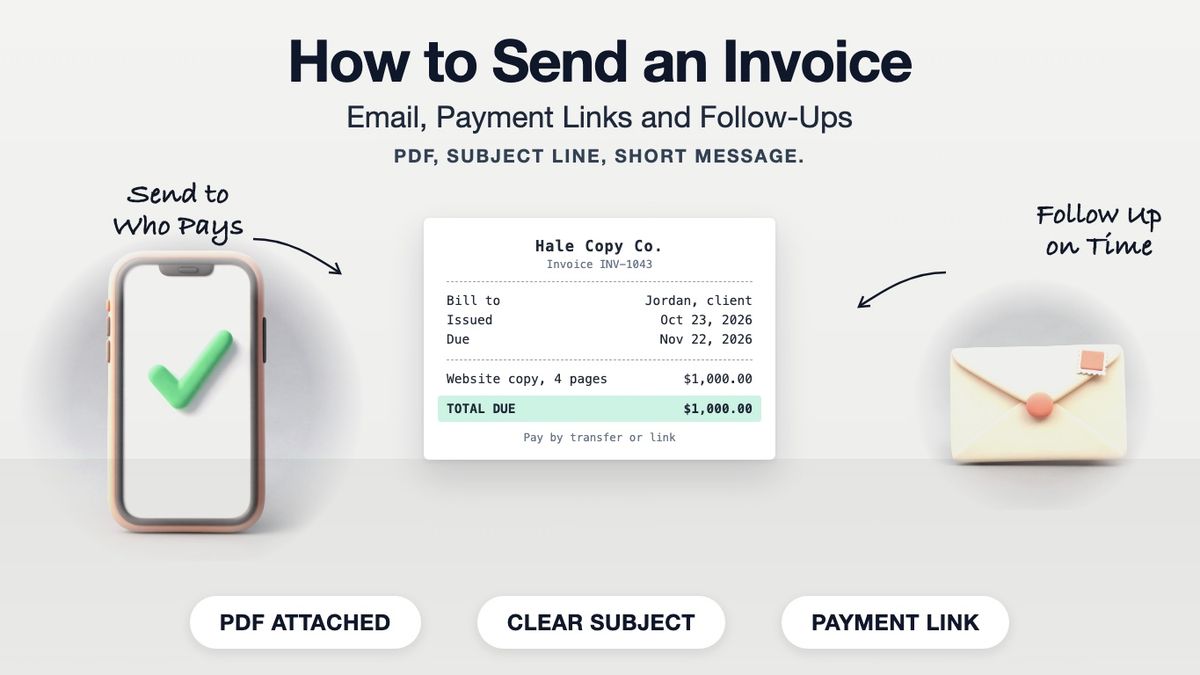
To send an invoice, save it as a PDF, attach it to an email addressed to the person who pays bills (not only the person who hired you), and use a subject line with your business name, the invoice number and the due date. In the message, state the amount, the due date and how to pay, and include a payment link if you accept online payment. Then put a reminder in your calendar for the due date.
If you have not made the invoice yet, start with our guide on how to make an invoice or open the invoice template, which has the invoice number, issue date, due date and balance due already laid out.
Before You Send: A Quick Check
| Check | Why |
|---|---|
| Invoice number is new | A repeated number gets the invoice rejected or lost |
| Due date is a real date | "Net 30" alone gets read differently by different people |
| Client name and PO number are right | Accounts payable matches invoices to purchase orders |
| Totals add up | One wrong sum means a corrected invoice and another wait |
| Payment details are on the invoice | The client should never have to email to ask how to pay |
| File is a PDF named clearly | e.g. RiveraDesign_INV-1043.pdf |
How to Send an Invoice by Email
- Export the invoice as a PDF. It keeps the layout fixed and cannot be edited by accident. Name the file with your business name and invoice number.
- Find out who pays. In a small business it is usually the owner. In a larger company it is accounts payable, often a shared address such as ap@ or invoices@. Send to them and copy your contact.
- Write a subject line they can search for. Business name, invoice number, amount or due date.
- Keep the message short. Amount, due date, what it covers, how to pay. Everything else is on the PDF.
- Attach the PDF and add a payment link if you have one.
- Send it on the day the work is delivered. Every day you wait is a day added to when you get paid.
- Log it. Record the invoice number, amount, date sent and due date in a spreadsheet or your accounting software.
Subject lines that work
- Invoice INV-1043 from Hale Copy Co. – $1,000 due Nov 22
- Hale Copy Co. invoice INV-1043 (website copy, October)
A message you can copy
Hi Jordan,
>
Attached is invoice INV-1043 for the website copy delivered on October 23: four pages, $1,000.00, due November 22, 2026.
>
You can pay by bank transfer (details on the invoice) or online using this link: [your payment link].
>
Let me know if accounts payable needs a W-9 or a PO number added.
>
Thanks,
Alex Hale, Hale Copy Co.
Payment Links
A payment link is a URL from your payment processor or invoicing service that opens a checkout page for the amount due. The client clicks, pays by card or bank, and you are notified. They usually get you paid faster because there is nothing to set up on the client's side.
Two things to know before you add one. Processors charge a fee on each payment, so check your provider's pricing page and decide whether to absorb it. And put the same link on the PDF and in the email, so a client who prints the invoice can still find it.
Other ways to send an invoice:
- Through accounting or invoicing software, which emails it and tracks when it is opened.
- Through a client's supplier portal. Some large companies require you to upload invoices there instead of emailing them.
- By mail. Still common with government agencies and some older businesses. Mail a printed copy and keep the PDF.
When and How to Follow Up
| When | What to send |
|---|---|
| 3 days before the due date | A friendly reminder: amount, due date, payment link |
| On the due date | "Today is the due date for INV-1043." |
| 7 days late | A firmer note, the invoice attached again, and a direct question: when can I expect payment? |
| 14 to 30 days late | A phone call, then a final written notice that states any late fee you agreed on in advance |
Reply to your original email each time, so the whole history sits in one thread. Be specific and polite. Most late invoices are stuck in someone's inbox, not disputed.
When payment arrives, send a short thank-you and mark the invoice paid. If the client wants proof of payment, send a receipt. Our partial payment receipt guide covers what to send when only part of the balance comes in.
Make the Invoice First
The invoice template builds the PDF you attach: your details, the bill-to block, invoice number, dates, line items and balance due. Building it is free; a watermark-free download needs Pro.
Frequently asked questions
- What is the best way to send an invoice?
- Email a PDF to the person who pays bills, with a clear subject line and a short message stating the amount, due date and how to pay.
- What should I write in an email when sending an invoice?
- The invoice number, what it covers, the amount, the due date and how to pay. Two or three sentences is enough; the details are on the attached PDF.
- What subject line should I use for an invoice email?
- Include your business name, the invoice number and the due date or amount, for example: Invoice INV-1043 from Hale Copy Co., $1,000 due Nov 22.
- Should I send an invoice as a PDF or a Word file?
- PDF. It looks the same everywhere and cannot be edited by accident.
- Who should I send the invoice to?
- The person or team that pays bills, usually accounts payable in a larger company, with your main contact copied.
- When should I send an invoice?
- As soon as the work is delivered or the agreed milestone is reached. Payment terms run from the invoice date, so a late invoice means late payment.
- Can I send an invoice by text message?
- You can send a payment link by text for small jobs, but email a PDF as well so the client has a copy for their records.
- How soon should I follow up on an unpaid invoice?
- Send a reminder a few days before the due date, another on the due date, and a firmer one about a week after it passes.
- Do payment links cost money?
- Usually yes. Payment processors charge a fee per payment. Check your provider's pricing page before adding a link.
- Should I send a receipt after an invoice is paid?
- It is good practice and some clients require it. A receipt, or the invoice marked paid, confirms the balance is cleared.