Zelle, Cash App and Venmo Receipts: Where to Find Them and What to Send
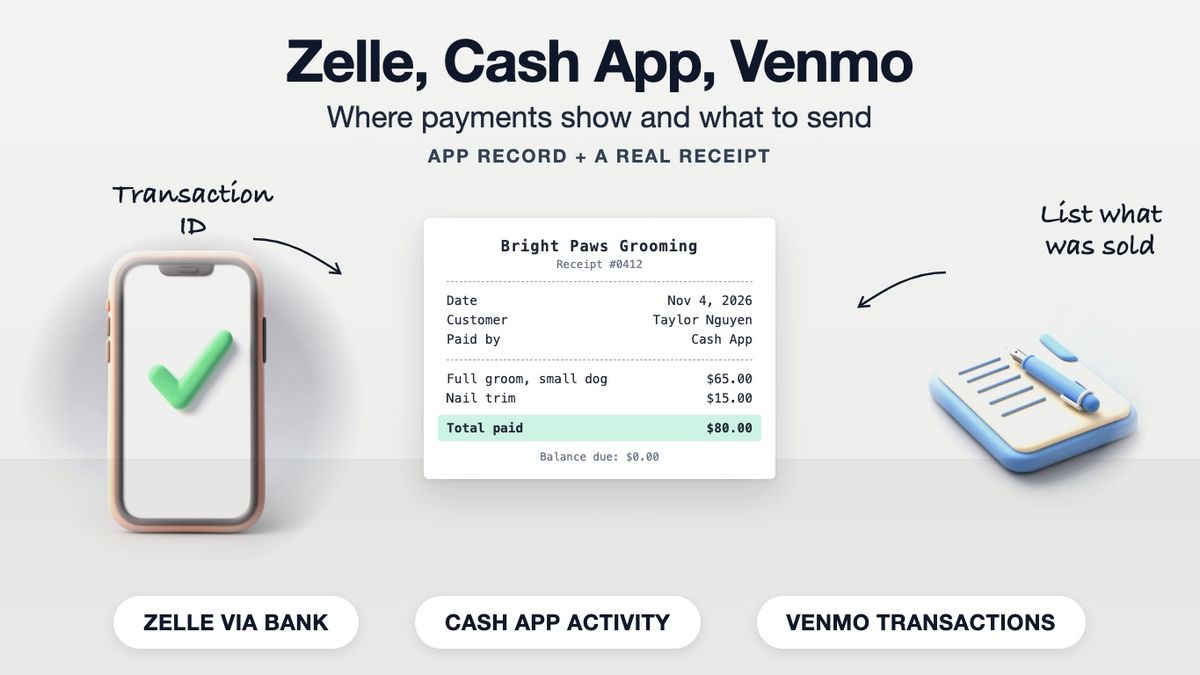
Zelle, Cash App and Venmo each keep a record of the transfer: Zelle payments appear in your bank's app or online banking, Cash App payments in the Activity tab, and Venmo payments under Transactions on the Me tab. Those records show the amount, date and the other person. They do not show what was sold, so a business paid through one of these apps should still give the customer a receipt listing the goods or service, the amount, the app used and its transaction ID. Our cash receipt template has the fields for it.
To give someone a receipt for money you received through one of these apps, start from the matching template: PayPal receipt generator, Venmo receipt generator, Cash App receipt generator or Zelle receipt generator.
Where Each App Shows Payment Details
| App | Where to look | Official source |
|---|---|---|
| Zelle | Payment activity in your bank's or credit union's app or online banking | [Zelle support](https://www.zelle.com/support/i-sent-money-to-someone-and-they-never-received-it-what-should-i-do) |
| Cash App | Activity tab (clock icon), then tap the payment; or cash.app/account on the web | [Cash App help: account activity](https://cash.app/help/us/en-US/6540-view-cash-app-account-activity) |
| Venmo | Me tab, Transactions toggle, then tap the payment; monthly statements under Settings, Statements | [Venmo help: transaction history](https://help.venmo.com/cs/articles/transaction-history-vhel281) |
Zelle. Zelle runs inside banks, so the record lives with your bank. Zelle's own support pages tell you to check the payment status in your bank's online or mobile service, and to take payment questions to your bank. What the payment detail screen shows, and whether there is a confirmation number, depends on the bank.
Cash App. Cash App's help centre says to open the Activity tab and tap a payment to see its details, or sign in at cash.app/account on the web. Sellers who take payments with Cash App's Tap to Pay can send a customer receipt from the payment in Activity. For an ordinary person-to-person payment, the help centre describes payment details rather than a receipt.
Venmo. Venmo's help centre shows recent payments on the Me tab under Transactions, with more detail when you tap one. For a fuller record, Settings, then Statements lets you download a monthly CSV or have it emailed. Business profiles taking Tap to Pay payments can send the customer an emailed receipt, according to Venmo's payments FAQ.
Menu names change between app versions. If a step above does not match your screen, the linked help page is the place to check.
Why a Seller Should Still Write a Receipt
A payment screen proves money moved between two accounts. It leaves out the things a customer or an auditor actually asks about:
- what was sold and in what quantity
- the price of each item, and any tax
- your business name, address and contact details
- whether the amount was paid in full or is a deposit
- the receipt number you will look up if there is a return or dispute
Customers who expense purchases or claim them for tax need that detail. The IRS lists paid bills, invoices and receipts as supporting documents and notes that a combination of records may be needed to support an expense (IRS: What kind of records should I keep). For the payer's side of this, see proof of payment.
What to Put on a Receipt for an App Payment
| Field | Example |
|---|---|
| Your business name and contact | Bright Paws Grooming, (555) 010-8823 |
| Receipt number | 0412 |
| Date paid | Nov 4, 2026 |
| Customer | Taylor Nguyen |
| Items or services | Full groom, small dog: $65.00; Nail trim: $15.00 |
| Total | $80.00 |
| Paid by | Cash App, to $BrightPaws |
| Transaction ID | Copied from the payment details screen |
| Balance due | $0.00 |
Steps:
- Wait until the payment shows as completed in your app or bank, not pending.
- Open the payment details and copy the amount, date and any transaction or reference ID.
- Fill in the receipt with the items, the app name and that ID.
- If it was a deposit, show the balance still due; a partial payment receipt layout fits.
- Email or text the PDF to the customer and keep a copy with your records.
For a sale with several items or sales tax, the sales receipt template adds quantity and tax lines.
A Note on Business Payments
Each app has its own terms for using a personal account to receive business payments, and some offer separate business accounts or profiles. Read the terms for the app you use. Whatever the app, a receipt should only record a payment that actually happened.
Making the Receipt
Our cash receipt template has a payment-method field where "Zelle", "Cash App" or "Venmo" and the transaction ID go. Building and previewing are free in the browser; a watermark-free download needs Pro.
Frequently asked questions
- Does Zelle give a receipt?
- Zelle payments are recorded in your bank's app or online banking. Zelle's support pages send you to your bank's payment activity, and what the detail screen shows depends on the bank.
- Where do I find a Cash App receipt?
- Open the Activity tab and tap the payment to see its details, or sign in at cash.app/account. Sellers using Cash App Tap to Pay can send customers a receipt from the payment.
- How do I get a Venmo receipt?
- Tap the payment under Transactions on the Me tab for its details, or download a monthly statement from Settings, Statements. Businesses using Venmo Tap to Pay can email a receipt.
- Is a payment app screenshot a receipt?
- It shows money moved, but not what it was for. A receipt from the seller listing the items, amount and transaction ID is a fuller record.
- Should a business send a receipt for a Venmo, Zelle or Cash App payment?
- Yes. The app record does not list the goods or services, your business details or a receipt number, which customers need for expenses, returns and disputes.
- What should a receipt for an app payment include?
- Business details, receipt number, date, customer, items and prices, total, the app used, the transaction ID and any balance due.
- Where is the transaction ID?
- In the payment details screen of the app or, for Zelle, your bank's app. Its label varies by app and bank.
- Can I download a statement of my app payments?
- Venmo offers monthly CSV statements under Settings, Statements. For Zelle, use your bank statement. For Cash App, check its help centre for current statement options.
- When should I issue the receipt?
- Once the payment shows as completed, not while it is pending.
- Can I take business payments on a personal account?
- Each app sets its own rules. Read the terms of the app you use; some offer business accounts or profiles.