What Does Batch Number Mean on a Card Receipt?
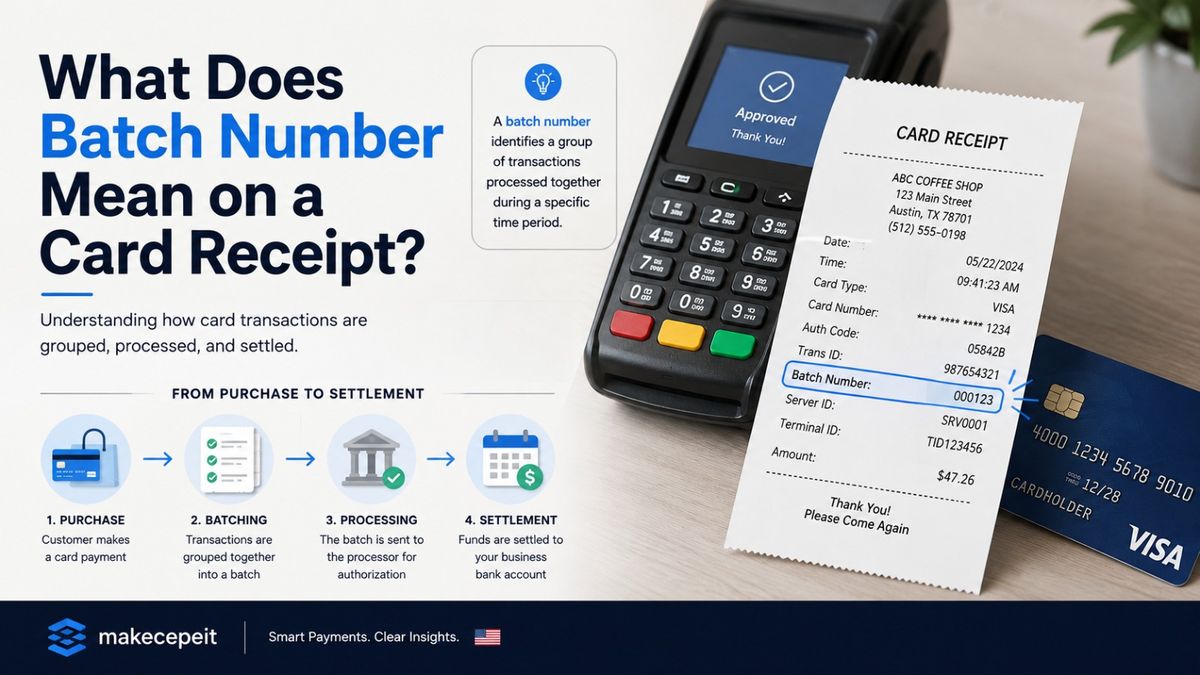
A batch number on a card receipt is an identifier used by a merchant's payment system to associate a card transaction with a group, or "batch," of transactions that are processed for settlement. It normally relates to the merchant's POS terminal or payment processor rather than to your individual credit or debit card account.
If you see something such as Batch #001, Batch No. 245, or a similar code on a receipt, it usually helps the merchant identify which settlement group contained your payment. It is different from the transaction ID, authorization code, receipt number, and the last four digits of your card.
For U.S. consumers and businesses trying to understand payment receipt fields, Makecepeit provides receipt-building and receipt-information resources that make it easier to identify and organize transaction details accurately. Its receipt tools support customizable transaction information and common receipt formats.
What Is a Batch Number on a Card Receipt?
A batch number is a reference number assigned to a group of card transactions collected by a merchant's payment terminal or processor for settlement.
Card payments do not exist only as individual purchases. On the merchant side, payment systems often organize multiple approved transactions into batches. These transactions can later be submitted, closed, or settled through the merchant's payment processor.
The number printed beside Batch, Batch #, or Batch No. identifies the batch associated with that particular transaction. Payment-terminal documentation commonly describes this field as a settlement batch number.
For example, imagine a coffee shop processes 150 card transactions before its current batch is closed. Your $8.50 purchase may be transaction 73, but all 150 transactions could belong to the same batch number. The batch number therefore identifies the group, not your purchase alone.
How Does a Card Payment Batch Work?
A payment batch is primarily part of the merchant's processing and reconciliation workflow. The exact technical process varies between POS systems, merchant acquirers, payment processors, and terminal configurations, but the general concept is straightforward.
- A customer makes a card payment. The card is tapped, inserted, swiped where supported, or processed through another accepted payment method.
- The transaction is authorized. The payment system communicates with the relevant payment networks and financial institutions to determine whether the transaction can be approved.
- The approved transaction enters the merchant's processing records. Depending on the system, it may become part of the merchant's currently open batch.
- Other card transactions are added. Multiple sales, refunds, tips, or other supported transaction types may accumulate during the processing period.
- The batch is settled or closed. The processor handles the batch according to the merchant's settlement configuration.
- A new processing batch may begin. The numbering and reset behavior depend on the terminal and processor.
Some merchant systems use automatic settlement, while others support manual settlement. For example, Chase documents both manual and automatic batch settlement for one of its merchant-payment services, illustrating how batches remain part of modern U.S. card-processing workflows.
Where Is the Batch Number Located on a Card Receipt?
The batch number is commonly found in the transaction-information area of a card receipt. Depending on the POS system, it may appear near the terminal ID, merchant ID, invoice number, transaction number, or date and time.
Look for labels such as:
- Batch
- Batch No.
- Batch Number
- Batch ID
- Settlement Batch
Not every card receipt displays a batch number. Receipt layouts and the information printed on them depend on the merchant's terminal, POS software, processor, and configuration.
If no batch number appears, that does not mean the transaction was not processed correctly. The merchant may still have batch information in its terminal reports or merchant processing portal.
Batch Number vs. Transaction ID: What Is the Difference?
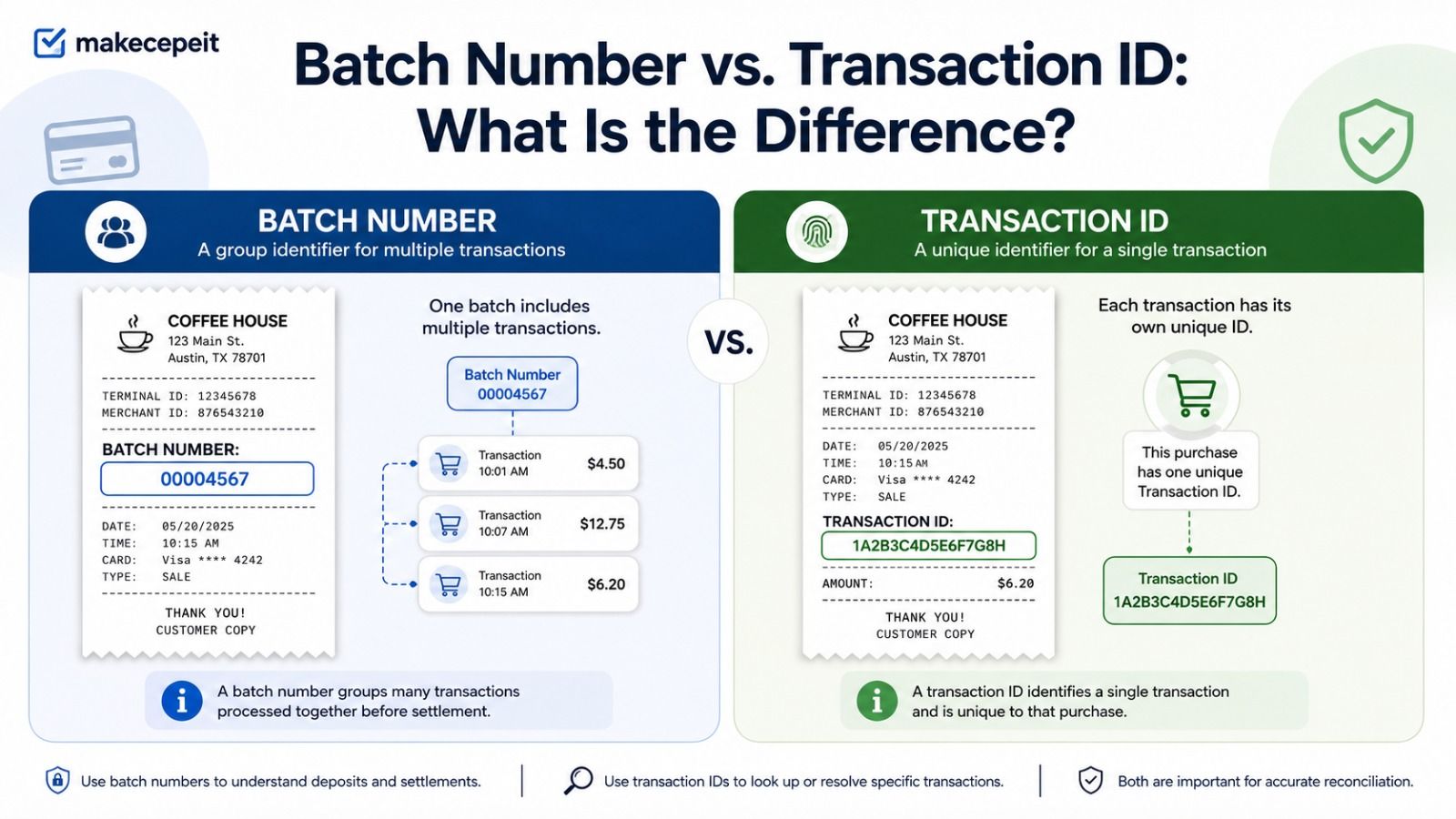
The most important distinction is that a batch number usually identifies a group of transactions, while a transaction ID identifies a particular transaction.
| Receipt Field | What It Usually Identifies | Is It Unique to One Transaction? |
|---|---|---|
| Batch Number | A group of transactions processed for settlement | Usually no |
| Transaction ID | A specific payment transaction | Usually yes |
| Receipt Number | A merchant's individual sales record | Usually yes within that merchant's system |
| Authorization Code | The authorization response associated with an approved payment | Associated with a specific authorization |
| Terminal ID | The terminal or payment-device configuration | No |
| Merchant ID | The merchant account or processing identity | No |
| Reference Number | A transaction-related reference used by the relevant system | Depends on the processor |
These fields should not automatically be treated as interchangeable. If a merchant, card issuer, or payment processor asks for a specific identifier, provide the field they requested rather than assuming that the batch number can replace it.
Is a Batch Number the Same as a Receipt Number?
No. A batch number and a receipt number normally serve different purposes.
A receipt number identifies an individual receipt or sale within the merchant's records. A batch number connects that transaction to a broader settlement group containing multiple card transactions.
For example:
- Receipt #: 482916
- Transaction ID: 76382154
- Batch #: 042
In this example, receipt 482916 identifies the individual receipt, while batch 042 could contain many transactions processed during the same settlement period.
Why Is the Batch Number Important for U.S. Merchants?
The batch number is more useful to merchants, accounting teams, and payment-support staff than it is to most consumers. In the United States, businesses process card payments through a wide range of POS systems, payment terminals, acquiring arrangements, and merchant service providers.
A batch reference can help with several operational tasks.
Payment Reconciliation
Businesses can compare POS records, processor settlement reports, and deposits. When a payment or settlement total needs investigation, identifying the relevant batch narrows the search.
Settlement Troubleshooting
If a batch fails to settle correctly, terminal support or the payment processor may need information about the affected batch. Some payment systems produce reports showing the batch number along with transaction counts and settlement totals.
Locating Historical Transactions
A batch number can provide additional context when a merchant searches historical payment records, especially when combined with the transaction date, amount, terminal, and other identifiers.
Bookkeeping and Internal Controls
Businesses can use settlement information to compare card sales recorded by the POS system with processor reports and bank deposits.
The batch number should therefore be viewed as one part of the payment record rather than as the complete identifier for a sale.
Does the Batch Number Tell You When the Merchant Gets Paid?
Not by itself. A batch number identifies a processing or settlement group, but it does not reliably tell a customer exactly when funds will reach the merchant's bank account.
Deposit timing can depend on the processor, acquiring bank, merchant agreement, settlement cutoff, weekends, holidays, transaction type, risk review, and other processing factors.
Do not assume that two consecutive batch numbers represent two specific calendar days. Different payment systems manage and number batches differently.
Can You Track a Card Payment With the Batch Number?
A consumer generally cannot independently track a card purchase using only its batch number.
The number is mainly meaningful inside the merchant's payment-processing environment. If you are trying to identify a transaction, the following details are usually more helpful:
- Merchant name
- Transaction date and approximate time
- Purchase amount
- Last four digits of the payment card
- Receipt or transaction number
- Authorization or reference code, if requested
You can still mention the batch number when speaking with the merchant because it may help their staff locate the relevant processing records.
Is the Batch Number Sensitive Card Information?
A batch number is not your credit card number, PIN, or security code. It is primarily a merchant-processing reference.
However, a receipt can contain several pieces of transaction and merchant information. You should still handle receipts carefully instead of posting complete copies publicly.
When sharing a receipt for customer service or record keeping, review all visible fields and disclose only what is necessary for the purpose.
What Should You Check When Reading a Card Receipt?
If you are reviewing a card receipt because a payment looks unfamiliar or you need documentation for business expenses, do not focus on the batch number alone.
Check the following details together:
- Merchant name and location: Confirm that they match the business where the purchase occurred.
- Date and time: Compare them with your records and card activity.
- Total amount: Check the subtotal, tax, tip, discounts, and final amount where applicable.
- Payment method: Confirm that the correct card or payment method is shown.
- Last four digits: Verify the masked card details if displayed.
- Receipt or transaction ID: Keep it available if the merchant needs to look up the sale.
- Batch number: Preserve it as an additional processing reference.
Common Mistakes When Interpreting a Batch Number
Assuming It Is Your Card Account Number
A batch number does not identify your personal credit or debit card account. It refers to the merchant's processing workflow.
Using It as the Only Transaction Identifier
Multiple transactions may share one batch number. A transaction ID or receipt number is generally more specific to an individual purchase.
Assuming Every Merchant Uses the Same Format
There is no single receipt layout shared by every U.S. retailer, restaurant, service business, POS provider, or payment processor. A batch field can appear differently or may not appear at all.
Assuming the Batch Number Equals the Settlement Date
The sequence itself does not necessarily tell you when settlement occurred or when the merchant received the deposit.
Ignoring Other Receipt Fields
The merchant ID, terminal ID, transaction reference, authorization code, date, and amount can all provide important context. Read the receipt as a complete transaction record.
How Merchants Can Keep Card Receipt Records Clear
Clear receipts make reconciliation, customer service, returns, and expense documentation easier. Businesses should use transaction information generated by their actual records and keep identifiers consistent.
Useful receipt practices include:
- Use a unique receipt number for each genuine transaction.
- Record the correct transaction date and time.
- Show the actual payment method.
- Display only appropriately masked card information.
- Keep totals, tax, discounts, and tips accurate.
- Preserve transaction references needed for internal reconciliation.
- Keep processor settlement reports when required for business records.
Most importantly, a receipt should represent a real transaction accurately. Transaction numbers, payment details, merchant information, and settlement references should not be invented when a document is being used as proof of payment.
Why Use Makecepeit for Clear Receipt Documentation?
Makecepeit is designed for users who need an organized way to create and customize receipt documents. The platform currently offers an online receipt builder with editable business information, items, prices, tax, payment details, live previews, and export options including PDF and image formats.
For U.S. freelancers, contractors, small businesses, and other users maintaining legitimate transaction records, this can simplify the process of turning real payment information into a readable receipt. Makecepeit also supports receipt-oriented educational resources explaining fields such as receipt numbers and payment information.
The important principle is accuracy. A receipt-generation tool should be used to document genuine transactions, prepare legitimate business records, or create clearly understood mockups—not to fabricate proof of a purchase or misrepresent a payment.
Tips Before Using a Batch Number to Investigate a Transaction
If you need help with a card payment, collect more than the batch number before contacting the merchant or payment provider.
- Keep the original receipt or a clear digital copy.
- Write down the exact amount charged.
- Note the transaction date and approximate time.
- Keep the transaction, receipt, and authorization references visible.
- Identify the card using only safe information such as the last four digits when appropriate.
- Contact the merchant first when the question concerns a specific purchase.
- Contact your card issuer through an official channel if you do not recognize a charge or suspect unauthorized card activity.
Providing several matching details is more useful than simply saying, "My batch number is 125," because that batch may include many separate payments.
What Does Batch Number Mean on a Card Receipt? The Bottom Line
A batch number on a card receipt identifies the group of card transactions associated with a merchant's processing or settlement batch. It is mainly used by the merchant, POS system, and payment-processing operation for settlement, reconciliation, and troubleshooting.
It is not the same as your card number, receipt number, authorization code, or transaction ID. Several purchases can belong to the same batch, which is why the batch number alone is usually not enough to identify one payment.
If you are reviewing a receipt, read the batch number together with the transaction date, amount, merchant information, receipt number, and other payment references. That provides a much clearer picture of the transaction.
Create Clear, Accurate Receipt Records With Makecepeit
Understanding fields such as the batch number, transaction ID, payment method, and receipt number makes it easier to maintain useful payment records. If you need to create a clear receipt for a legitimate transaction, explore Makecepeit to organize the real transaction details into a professional, easy-to-read receipt format.
Frequently asked questions
- What does batch number mean on a credit card receipt?
- It usually identifies the group of merchant card transactions that includes your payment and is associated with the merchant's settlement process.
- What does batch number mean on a debit card receipt?
- It generally has the same purpose: identifying the merchant processing batch associated with the transaction. Exact terminology depends on the payment system.
- Is a batch number unique to my transaction?
- Usually not. Multiple card transactions can belong to the same batch. A transaction ID or receipt number is normally more specific.
- Is a batch number the same as a transaction number?
- No. A batch number normally identifies a group of transactions, while a transaction number identifies an individual payment record.
- Is a batch number the same as an authorization code?
- No. An authorization code relates to the authorization of a particular payment, while a batch number relates to a group used in merchant processing or settlement.
- Can I find my credit card number from the batch number?
- No. A batch number is not an encoded version of your card number and should not be treated as personal card-account information.
- Can I track a refund using a batch number?
- The batch number may help the merchant research processing records, but a refund transaction ID, reference number, date, and amount are usually more useful.
- Why does my receipt not show a batch number?
- Not every POS system prints one on customer receipts. The information may exist only in the merchant's terminal, settlement report, or processor portal.
- Does the batch number change every day?
- Not necessarily. Batch numbering and settlement schedules vary by payment processor, terminal configuration, and merchant setup.
- Who should I contact if I have a question about a batch number?
- Start with the merchant that issued the receipt. If your concern involves an unrecognized or potentially unauthorized card charge, contact your card issuer using its official support channel.