Free Veterinary Receipt Generator PDF
A free veterinary receipt generator PDF helps veterinary clinics, mobile veterinarians, animal-care professionals, and pet owners create a clear record of a genuine veterinary payment. Instead of manually formatting a document, you can enter information such as clinic details, pet information, services provided, charges, payment method, and transaction details, then save or print the finished receipt as a PDF.
With makecepeit, users looking for a simple online receipt-making solution can prepare an organized veterinary receipt without building a document from scratch. A well-structured receipt can make recordkeeping easier for clinics and give pet owners a convenient document for their personal files, reimbursement requests, or expense tracking.
What Is a Veterinary Receipt Generator?
A veterinary receipt generator is an online tool used to create a payment receipt for legitimate veterinary services. It organizes transaction information into a readable document that can typically be printed or saved digitally.
The receipt may include the veterinary practice name, contact information, pet owner's details, animal information, services performed, individual charges, total amount paid, payment method, and payment date.
A veterinary receipt documents a completed financial transaction. It should accurately represent services that were actually provided and payments that actually occurred.
This distinction is important. A receipt is primarily proof of payment, while medical records contain clinical information such as diagnoses, examination findings, medications, test results, and treatment notes.
How to Create a Free Veterinary Receipt PDF
Creating a veterinary receipt should be straightforward. The main goal is to record enough information for the clinic and pet owner to understand what was paid for and when the transaction occurred.
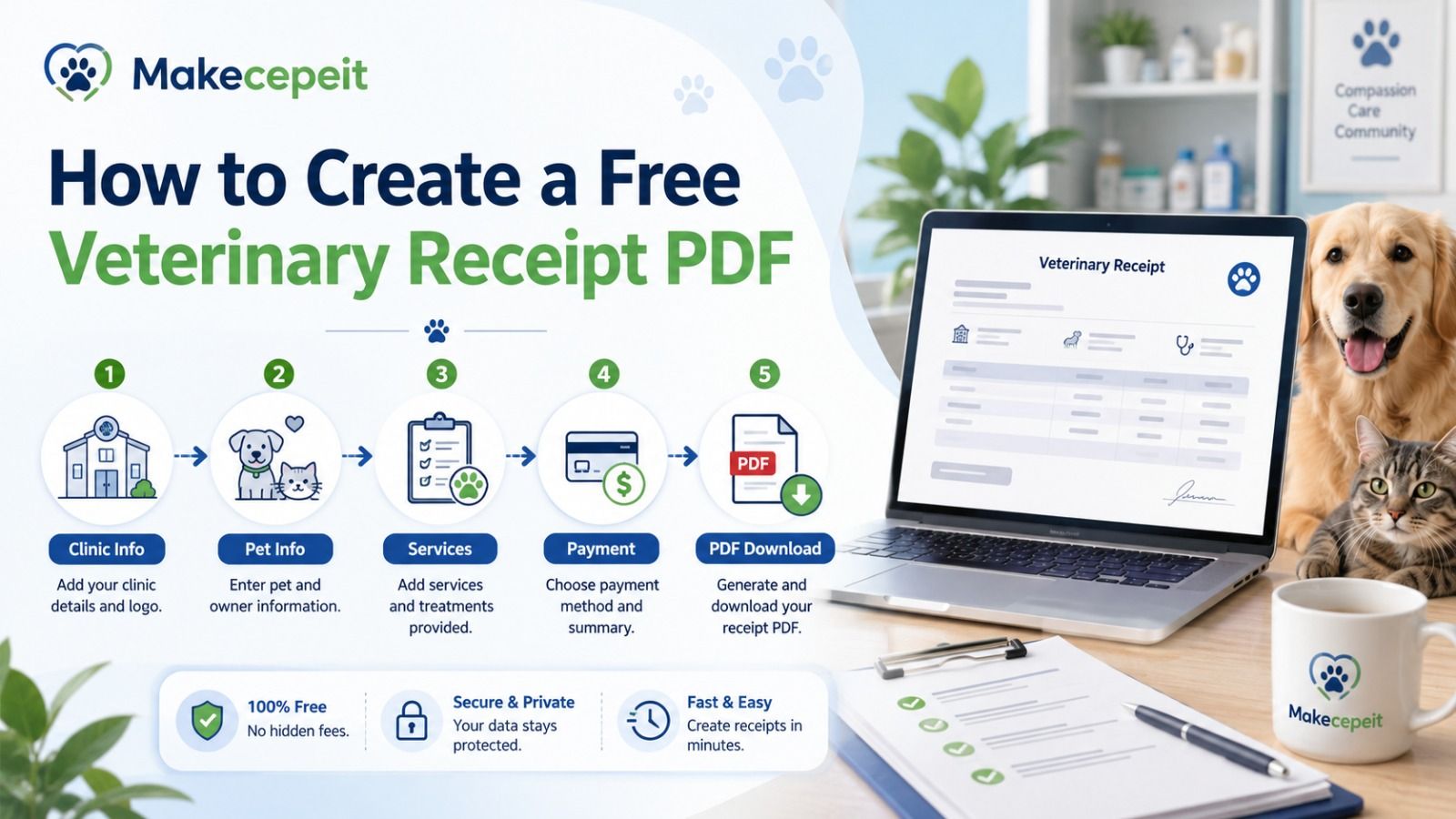
- Enter the veterinary clinic information. Add the practice or veterinarian name and relevant contact details.
- Add the pet owner's information. Enter the customer or pet owner's name as appropriate.
- Identify the pet. Include the pet's name and other relevant identification details when needed.
- List veterinary services. Add each genuine service, procedure, product, medication, or other charge separately when possible.
- Enter prices. Include the amount charged for each item.
- Calculate the total. Verify subtotals, adjustments, applicable taxes, and the final amount.
- Add payment information. Record the payment method and payment status accurately.
- Review the document. Check spelling, dates, amounts, and identifying information.
- Generate the receipt. Create the finalized document using makecepeit.
- Save or print the PDF. Keep a digital copy or provide one to the customer.
What Should a Veterinary Receipt Include?
A useful veterinary receipt should clearly identify the business, transaction, customer, and charges. The exact information may vary depending on the veterinary practice and purpose of the receipt.
| Receipt Section | Recommended Information | Why It Matters |
|---|---|---|
| Veterinary Practice | Clinic or veterinarian name and contact information | Identifies the provider |
| Receipt Details | Receipt number and transaction date | Helps organize records |
| Pet Owner | Customer or owner's name | Connects the payment to the client |
| Pet Information | Pet name and relevant identifying details | Connects services with the animal |
| Services | Itemized veterinary services or products | Explains the charges |
| Amounts | Individual prices, subtotal, tax where applicable, and total | Provides financial clarity |
| Payment | Payment method and amount paid | Documents the transaction |
Why Veterinary Clinics Benefit From PDF Receipts
Veterinary practices process many different types of transactions, from routine examinations to diagnostic testing, vaccinations, medications, dental procedures, grooming-related services, and emergency care.
Providing an organized PDF receipt can simplify communication between the veterinary practice and the pet owner.
Easier Recordkeeping
Digital receipts can be stored alongside accounting and customer records. A searchable filename or receipt number can make previous transactions easier to locate.
Professional Presentation
A consistent receipt format presents payment details more clearly than handwritten notes or loosely formatted text documents.
Convenient Customer Copies
Pet owners may want receipts for budgeting, personal expense records, employer benefit programs, pet insurance documentation, or other legitimate reimbursement processes.
Simple Digital Sharing
PDF files are commonly used because they preserve document formatting and can be viewed across many computers and mobile devices.
Why Veterinary Receipts Matter to U.S. Pet Owners
Across the United States, veterinary care can involve several separate charges during a single visit. An appointment might include an examination, laboratory work, imaging, medication, vaccination, supplies, or other services.
An itemized veterinary receipt helps the owner understand how the final amount was calculated.
This can be useful whether the clinic serves customers in New York, Los Angeles, Chicago, Houston, Miami, Dallas, Phoenix, or a smaller U.S. community. The core purpose remains the same: accurately documenting a real veterinary transaction.
Some owners may also need documentation when submitting eligible expenses to a pet insurance provider. Requirements vary between insurers and policies, and a payment receipt alone may not contain every document an insurer requests. Veterinary medical records, diagnoses, or other supporting documentation may also be required.
Veterinary Receipt vs. Veterinary Invoice: What Is the Difference?
A veterinary invoice generally requests payment, while a veterinary receipt confirms payment.
| Veterinary Invoice | Veterinary Receipt |
|---|---|
| Usually issued before or when payment is due | Usually issued after payment |
| Shows an amount owed | Shows an amount paid |
| May contain payment terms | May contain payment method |
| Used for billing | Used as transaction documentation |
Some veterinary management systems combine invoice and payment information into one document. If you are manually creating documentation, clearly labeling the document helps avoid confusion.
Veterinary Receipt vs. Medical Record
A veterinary receipt should not be confused with an animal's medical record.
The receipt primarily contains financial information. A veterinary medical record may contain substantially more clinical information, including examination findings, medical history, diagnosis, medication, treatment decisions, laboratory results, imaging findings, and follow-up instructions.
If documentation is needed for insurance, continuity of care, or another formal purpose, ask the veterinary clinic what records are appropriate instead of assuming that a receipt alone will be sufficient.
Who Can Use an Online Veterinary Receipt Generator?
A veterinary receipt maker can be useful for several legitimate business situations.
- Independent veterinary clinics
- Animal hospitals
- Mobile veterinary providers
- Veterinary specialists
- Small animal-care practices
- Organizations that need to document legitimate veterinary payments
- Pet owners organizing genuine veterinary expense records
The information entered should always match the actual transaction. A receipt generator should not be used to fabricate veterinary services, false payments, medical treatment, insurance claims, reimbursements, or business expenses.
Why Use makecepeit for Veterinary Receipts?
makecepeit provides a practical way to prepare organized receipt documents without manually designing every field.
For someone searching for a free veterinary receipt generator PDF, convenience matters. The user generally wants to enter transaction information, organize the details clearly, and produce a document that can be saved for future reference.
A receipt generator can also reduce common formatting problems such as inconsistent spacing, missing totals, unclear service descriptions, or poorly organized payment information.
The most important part, however, remains the accuracy of the information entered. Before generating the final receipt, users should confirm that every service, amount, date, and payment detail matches the genuine transaction.
How to Write Better Veterinary Service Descriptions
Service descriptions should be specific enough for the customer to recognize the charge without turning the receipt into a complete medical report.
Instead of vague descriptions such as "service," use clear descriptions appropriate to the actual transaction, for example:
- Veterinary examination
- Vaccination administration
- Laboratory testing
- Diagnostic imaging
- Prescription medication
- Dental procedure
- Emergency examination
- Veterinary supplies
Only include services that were actually provided. Clinical terminology should also match the clinic's real records where relevant.
Tips Before Generating a Veterinary Receipt
Verify the Veterinary Practice Details
Check the practice name and contact information carefully. Incorrect business details can create confusion for customers trying to identify the transaction later.
Use the Correct Transaction Date
The receipt should reflect the actual payment or transaction date rather than an estimated or unrelated date.
Itemize Charges When Possible
Breaking the transaction into individual services gives both the business and customer a clearer financial record.
Check the Final Total
Review each price, subtotal, adjustment, applicable tax, and final payment amount before creating the PDF.
Keep Descriptions Accurate
Do not add diagnoses, procedures, medications, or treatments that were not actually provided.
Store Receipts Securely
Veterinary documents may contain customer and animal information. Businesses should use appropriate security and privacy practices when storing or transmitting them.
Common Veterinary Receipt Mistakes to Avoid
A professional-looking PDF is useful only when the underlying information is accurate. Several mistakes can reduce the usefulness of the document.
- Leaving out the payment date: The customer may not know when the transaction occurred.
- Using vague service descriptions: Generic descriptions make charges difficult to understand.
- Incorrect totals: Mathematical or entry errors can create accounting problems.
- Missing clinic identification: The document should clearly identify the genuine provider.
- Confusing invoices with receipts: Make it clear whether payment is outstanding or completed.
- Adding false information: Never create or modify receipts to misrepresent services, expenses, or payments.
- Assuming a receipt replaces medical records: Clinical documentation is different from proof of payment.
Can a Veterinary Receipt Be Used for Pet Insurance?
A veterinary receipt may form part of the documentation requested for a legitimate pet insurance claim, but requirements depend on the insurance provider and policy.
An insurer may request additional documentation such as an itemized invoice, veterinary medical records, diagnostic information, claim forms, or confirmation from the veterinary practice.
For this reason, pet owners should review their insurer's current requirements before submitting a claim. The information submitted should always accurately reflect the veterinary services received.
Can Veterinary Receipts Be Saved as PDF Files?
Yes. PDF is a practical format for veterinary receipts because it preserves the structure of the document when stored, printed, emailed, or opened on different devices.
A descriptive filename can make documents easier to organize. For example, a veterinary practice might use an internal format containing a receipt number or transaction date while following its own privacy and record-management policies.
Printable Veterinary Receipt or Digital Receipt?
Both formats can be useful. A digital PDF is convenient for email and electronic storage, while a printed receipt may be preferred by customers who maintain physical records.
Veterinary practices do not necessarily need to choose only one format. A PDF receipt can be saved digitally and printed whenever a paper copy is required.
Using Veterinary Receipt Templates Responsibly
Receipt generators and templates are productivity tools, not a way to create evidence for transactions that never occurred.
A veterinary receipt should correspond to a genuine payment involving a real provider, customer, and service. Creating false receipts for insurance claims, reimbursements, accounting records, tax records, or any other deceptive purpose can create serious problems.
When formal documentation is required, users should rely on accurate records issued or approved by the actual veterinary provider.
Free Veterinary Receipt Generator PDF: Quick Checklist
Before saving the finished document, confirm the following:
- The veterinary provider name is correct.
- The customer details are accurate.
- The correct pet is identified.
- Every listed service actually occurred.
- Prices match the genuine transaction.
- The final amount is correct.
- The payment method is accurate.
- The payment date is correct.
- The document clearly functions as a receipt.
- A copy is stored appropriately.
Conclusion
A free veterinary receipt generator PDF offers a convenient way to document real veterinary transactions without manually building a receipt from the beginning. A useful receipt clearly identifies the provider and customer, lists legitimate services, records accurate charges, and confirms payment information.
For U.S. veterinary practices, mobile veterinarians, animal-care businesses, and pet owners, organized PDF receipts can make financial recordkeeping easier while providing a document that is simple to store, print, or share when appropriate.
If you need to prepare a clean veterinary receipt for a genuine transaction, use makecepeit to enter the relevant details, review the information carefully, and create an organized receipt for your records.
Frequently asked questions
- Is there a free veterinary receipt generator PDF?
- Yes. Online receipt tools such as makecepeit can help users prepare a veterinary payment receipt and create a document suitable for digital storage or printing.
- What information should a veterinary receipt contain?
- It generally includes the veterinary provider, pet owner, pet details, transaction date, itemized services, charges, total payment, and payment method.
- Can I make a veterinary receipt online?
- Yes. An online veterinary receipt generator lets you enter genuine transaction information and organize it into a structured receipt.
- Can a veterinary receipt be downloaded as a PDF?
- A receipt generator may provide a printable or PDF-ready document that can be saved electronically, depending on the tool's available options.
- Is a vet receipt the same as an invoice?
- No. An invoice generally shows money owed, while a receipt normally confirms that payment has been made.
- Does a veterinary receipt replace medical records?
- No. A receipt primarily documents payment. Veterinary medical records contain clinical information about the animal's care.
- Can I use a veterinary receipt for pet insurance?
- A legitimate receipt may be part of an insurance claim, but insurers may require additional documents. Check your policy and provider requirements.
- Should veterinary services be itemized?
- Itemizing services is useful because it makes individual charges easier for customers, clinics, and other authorized parties to understand.
- Can independent veterinarians create receipts?
- Yes. Independent and mobile veterinary professionals can provide receipts for genuine services and payments, subject to their business and professional recordkeeping requirements.
- Can I edit a veterinary receipt after creating it?
- Correct genuine errors before finalizing the document. Any changes should accurately reflect the real transaction and should never be used to misrepresent services or payments.