Receipt Maker With QR Code and Barcode
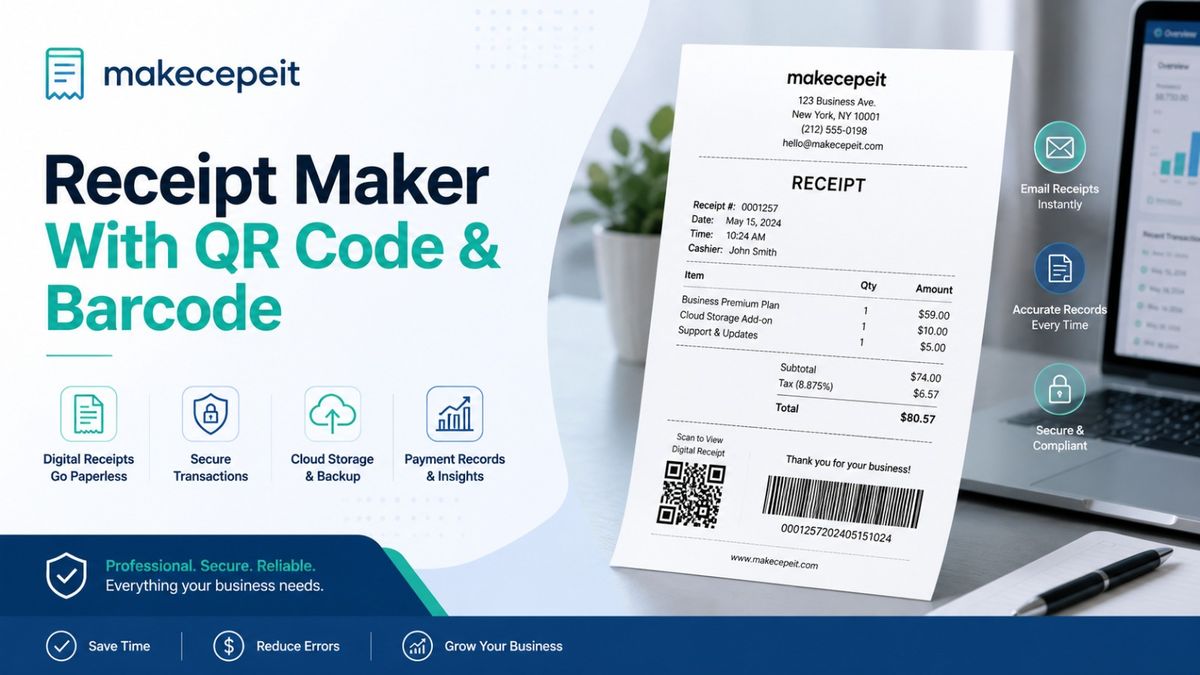
A receipt maker with QR code and barcode helps businesses create organized, professional transaction records that can include scannable references alongside standard receipt information. Instead of relying only on printed order numbers or manually entered transaction IDs, a business can use a QR code or barcode to connect a receipt with an order reference, payment record, customer information page, internal database entry, or other legitimate business resource.
For businesses in the United States, this can be useful for retail orders, freelance services, repairs, online sales, delivery transactions, events, and other situations where customers need a clear record of a completed transaction. makecepeit provides a practical way to prepare structured receipts while keeping important information easy to read and organize.
QR codes and barcodes should be used to improve legitimate recordkeeping and customer convenience. They should not be used to fabricate proof of purchase, alter real transaction records, impersonate another company, or misrepresent a payment that did not occur.
What Is a Receipt Maker With QR Code and Barcode?
A receipt maker with QR code and barcode is a tool that lets you create a receipt containing normal transaction details together with one or more machine-readable codes.
The visible receipt can include information such as the business name, transaction date, receipt number, items or services, quantity, subtotal, taxes, payment method, and total. A QR code or barcode can then represent a useful reference related to that transaction.
For example, a QR code might direct a customer to an order-status page, digital receipt, support page, warranty information, or legitimate payment record. A traditional barcode may encode a shorter identifier such as an order number, inventory reference, or transaction ID.
A good scannable receipt does not replace clear written transaction details. The QR code or barcode should support the receipt, not make the customer depend on scanning it to understand what they purchased.
QR Code vs. Barcode on a Receipt
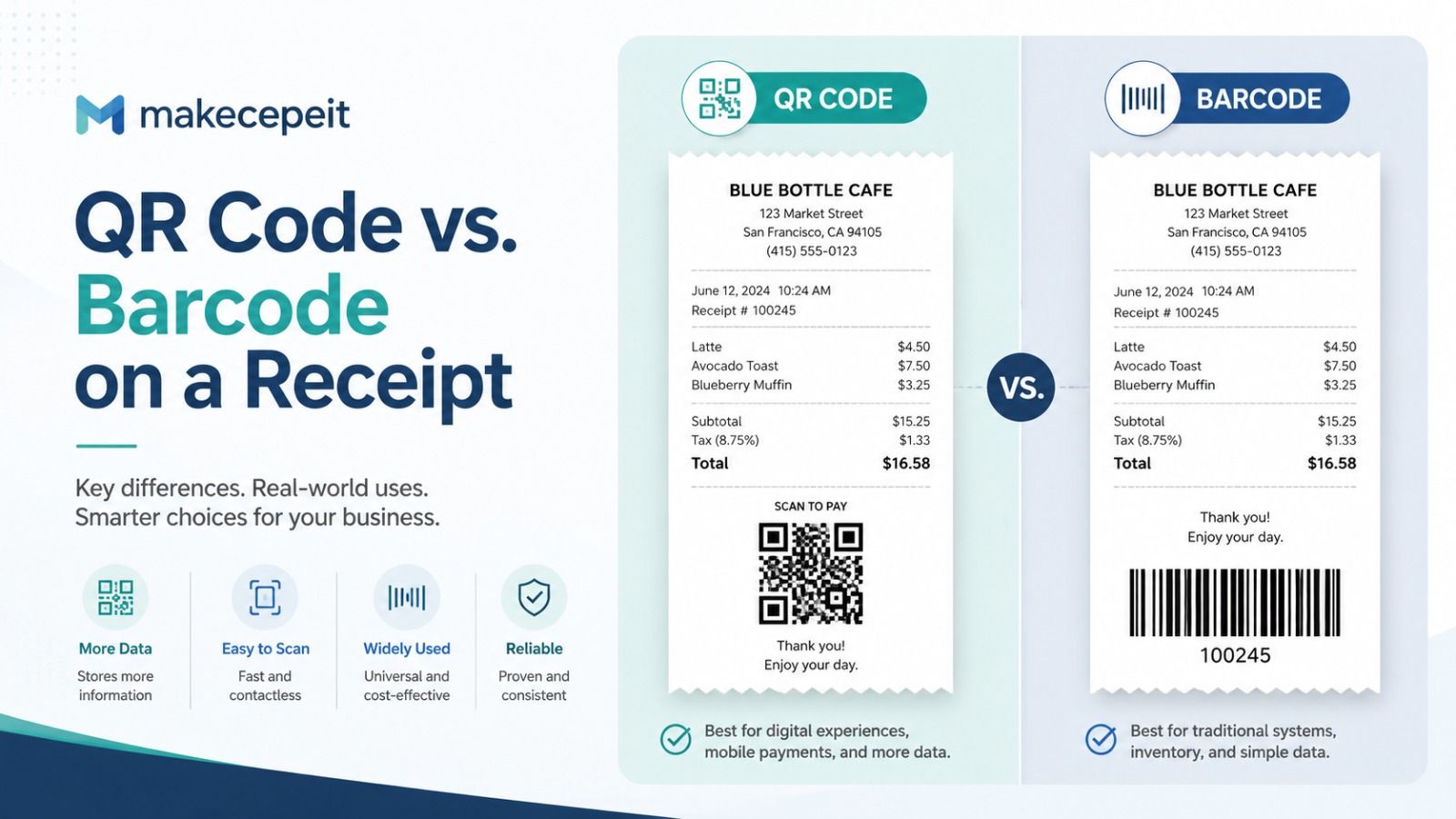
The main difference is the amount and type of information each format can handle. Traditional one-dimensional barcodes are commonly suited to shorter identifiers, while QR codes are two-dimensional symbols capable of carrying more information or a web address.
QR Code technology is standardized internationally under ISO/IEC 18004, and QR codes can store substantially more information than conventional linear barcodes.
| Feature | QR Code | Traditional Barcode |
|---|---|---|
| Data format | Two-dimensional | Usually one-dimensional |
| Typical receipt use | URLs, digital records, support pages, transaction references | Receipt numbers, order IDs, inventory references |
| Data capacity | Higher | Generally lower |
| Smartphone scanning | Usually convenient | Depends on barcode format and software |
| Space efficiency | Can encode more information in a compact area | Often requires more horizontal space |
| Best choice | Interactive or information-rich receipt experiences | Simple machine-readable identifiers |
There is no rule requiring every receipt to choose one format exclusively. In some workflows, having both can make sense. The barcode may support an internal transaction system while the QR code gives the customer access to additional information.
Why QR Codes Are Becoming More Relevant to U.S. Businesses
Two-dimensional codes are becoming increasingly important across the retail ecosystem because they can connect physical transactions with richer digital information.
GS1, the global standards organization behind many retail barcode standards, is working with the retail industry toward broader point-of-sale support for standardized two-dimensional barcodes by the end of 2027. GS1's current guidance includes QR Codes using GS1 Digital Link syntax and GS1 DataMatrix alongside existing linear barcode systems.
This broader shift does not mean every small business receipt needs a GS1 barcode. A freelance designer in New York, a repair company in Texas, or a local service provider in California may simply need a QR code that links a customer to a valid digital receipt or support page.
The important point is that consumers and businesses are increasingly comfortable moving between printed and digital transaction information.
What Can a Receipt QR Code Contain?
A receipt QR code should contain information that serves a clear business or customer purpose. In many situations, linking to an online record is more practical than placing large amounts of transaction data directly inside the code.
- A secure digital receipt URL.
- An order or transaction reference page.
- A customer support page.
- A legitimate invoice or payment-record page.
- A warranty registration page.
- A return or exchange information page.
- An appointment or service reference.
- A feedback or review page.
- A product information page.
- A business contact page.
When the information may change later, a controlled web destination is often preferable because the printed QR code can continue pointing to the same location while authorized information behind that link is maintained.
What Can a Receipt Barcode Represent?
A barcode is particularly useful when the receipt needs a short identifier that can be read by compatible business software or scanning equipment.
Common examples include a transaction number, order number, service ticket, return reference, customer reference, or internal document number.
Businesses should select barcode formats based on the systems that actually need to scan them. GS1 distinguishes between several barcode families, including UPC/EAN, GS1 DataBar, GS1-128, ITF-14, and two-dimensional barcode formats. Different standards are designed for different environments and use cases.
A generic internal receipt reference does not automatically require a GS1 identifier. Businesses integrating receipts with retail supply-chain systems should confirm the applicable barcode standard before implementation.
Benefits of Using a Receipt Maker With QR Code and Barcode
Faster Transaction Lookup
A scannable reference can reduce the need to manually type a long receipt or transaction number. Staff can scan the code and retrieve the relevant record when the underlying business system supports that workflow.
Better Customer Convenience
A QR code can provide a direct path from a printed receipt to useful online information. Customers do not need to manually enter a long web address or search for the correct support page.
More Organized Business Records
Consistent receipt numbers and machine-readable references can make transactions easier to organize, particularly when a business handles a large number of orders or service requests.
Professional Receipt Presentation
A properly structured receipt can look more complete when the business name, transaction information, totals, contact information, receipt reference, and scannable codes are arranged clearly.
Connection Between Printed and Digital Records
One of the strongest uses of a QR code is connecting a physical document to an authorized digital resource. A customer can retain the printed receipt while still accessing additional online information when needed.
How to Make a Receipt With a QR Code and Barcode
The process should begin with the real transaction information, followed by the receipt layout and finally the scannable reference.
- Enter the business information. Add the legitimate business or service-provider name and relevant contact details.
- Add the transaction date. Use the actual date associated with the transaction or document.
- Create a receipt number. Use a consistent numbering system so records remain organized.
- Add the purchased items or services. Describe what the customer actually purchased.
- Enter prices and quantities. Make sure the figures match the underlying transaction record.
- Calculate totals accurately. Include subtotal, discounts, applicable taxes, fees, and final total where relevant.
- Select the appropriate payment description. Use accurate information rather than implying that a payment occurred when it did not.
- Create the QR code. Encode a useful reference or approved destination such as a digital receipt page.
- Add the barcode if required. Use it for a transaction or order identifier that matches your operational system.
- Test both codes. Scan them before printing, emailing, or providing the receipt to the customer.
What Information Should a Professional Receipt Include?
A receipt should allow the customer and business to understand the transaction even without scanning a QR code.
- Business or seller name.
- Receipt or transaction number.
- Date of transaction.
- Description of products or services.
- Quantity where applicable.
- Individual prices.
- Subtotal.
- Applicable taxes or fees.
- Discounts when relevant.
- Final transaction total.
- Payment-method description where appropriate.
- Business contact information.
- QR code or barcode when useful.
The exact information required for legal, accounting, tax, reimbursement, or industry-specific purposes can vary. Businesses should keep their underlying accounting and transaction records and consult applicable requirements when a receipt is being used for regulated reporting.
Receipt QR Codes for Different U.S. Business Types
Retail Businesses
Retailers can use a QR code to connect customers with digital order information, product documentation, return instructions, loyalty programs, or customer service resources.
Freelancers and Independent Contractors
A freelancer may use a professional receipt after receiving legitimate payment for design, writing, consulting, photography, marketing, or other services. A QR code can direct the client to an authorized project or invoice reference.
Repair and Home-Service Businesses
Contractors, appliance technicians, cleaning companies, automotive services, and similar businesses may use transaction references to organize completed jobs and customer documentation.
E-Commerce Sellers
Online sellers can include a scannable receipt with an order so buyers can access order information, instructions, customer support, or return procedures.
Event and Local Service Providers
Photographers, equipment-rental companies, event organizers, and other service businesses can associate receipts with booking or transaction references for easier record retrieval.
Why Use makecepeit for Structured Receipt Creation?
makecepeit is relevant for users who want to prepare clean, structured receipt documentation without manually designing every element from the beginning.
The practical value of a receipt-making workflow is consistency. Instead of placing information randomly inside a document, users can focus on the transaction details that matter: business information, receipt number, date, item description, pricing, totals, payment details, and scannable references when appropriate.
For a small business, freelancer, online seller, or service provider, this can make receipt preparation easier to manage while maintaining a professional presentation.
However, a generated receipt should accurately represent a genuine transaction. A receipt maker is a documentation tool, not a substitute for bank records, processor confirmations, tax documents, or original merchant records when those documents are required.
How to Create a QR Code That Scans Reliably
A QR code is useful only when customers can scan it successfully. The code should therefore remain visually clear and should not be distorted during receipt creation or printing.
DENSO WAVE documents four QR error-correction levels—L, M, Q, and H—which provide increasing levels of data restoration when parts of the symbol are damaged or obscured.
For everyday receipt use, businesses should focus on several practical principles:
- Maintain strong contrast between the code and its background.
- Do not stretch or distort the QR code.
- Leave sufficient clear space around the symbol.
- Avoid placing important graphics over the code.
- Do not make the printed code unnecessarily small.
- Test the final PDF or printed receipt rather than only testing the original digital image.
- Verify the destination before distributing receipts.
Dynamic vs. Static QR Codes for Receipts
A static QR code permanently contains the destination or information encoded when it is created. A dynamic workflow generally uses a controlled redirect or managed link that can send users to information maintained by the business.
For a permanent transaction reference that will never change, a static code may be enough. For customer-service resources or managed receipt pages, a controlled web-based destination can provide greater flexibility.
Businesses should also consider privacy. Avoid placing unnecessary confidential customer information directly inside a QR code because anyone who obtains the receipt may potentially scan it.
Should You Put Both a QR Code and Barcode on a Receipt?
Yes, if each code serves a different legitimate purpose. A QR code might serve the customer while a barcode supports internal processing.
For example:
- QR code: opens the customer's digital receipt.
- Barcode: represents transaction ID 458271 inside the business system.
Adding both codes without a reason can make a receipt unnecessarily complicated. Use only the information that supports an actual workflow.
Common Mistakes to Avoid
Encoding Incorrect Information
A perfectly designed code is still useless when it contains the wrong transaction ID or URL. Always verify the encoded value.
Using a QR Code That No Longer Works
If the code points to a webpage, make sure the destination remains active and relevant for as long as customers may reasonably need the receipt.
Making the Code Too Small
Receipt printers and PDF scaling can reduce image clarity. Test the finished document at its intended size.
Putting Sensitive Information in the Code
Avoid encoding passwords, full payment credentials, sensitive personal information, or confidential data that should not be visible to anyone holding the receipt.
Using Fake Transaction Details
Do not create receipts that falsely represent purchases, payments, merchants, dates, amounts, tax information, or other transaction facts. Legitimate receipts should correspond to genuine business activity.
Using the Wrong Barcode Standard
If the barcode must communicate with retail, inventory, logistics, or point-of-sale infrastructure, confirm that the selected format is compatible with that system rather than choosing a barcode based only on appearance.
Tips Before Choosing a Receipt Maker
Look beyond the appearance of the receipt. A useful receipt-making tool should help you create documents that remain clear, accurate, and usable after they are saved, printed, or shared.
- Check whether you can enter the transaction fields your business actually needs.
- Make sure the final document remains readable on mobile devices.
- Confirm that QR codes remain scannable after export.
- Use consistent receipt-number formatting.
- Keep source transaction records separately.
- Avoid adding unnecessary customer information.
- Review amounts, dates, and tax information before finalizing the receipt.
- Use legitimate company information.
- Test the document before using it in a regular customer workflow.
QR Codes and the Future of Digital Transaction Information
QR codes are becoming part of a broader movement toward richer machine-readable information. GS1's current retail guidance explains that standardized two-dimensional codes can connect identifiers with additional information such as batch data, serial numbers, product details, recycling information, and other online resources.
GS1's 2026 guidance continues to identify the end of 2027 as the industry goal for retail point-of-sale systems to support defined GS1-conformant 2D barcodes alongside existing linear barcodes.
For ordinary business receipts, the lesson is straightforward: a receipt no longer has to be an isolated piece of paper. When implemented responsibly, a scannable code can provide a convenient bridge between a transaction document and the digital information associated with it.
Final Thoughts
A receipt maker with QR code and barcode can help businesses create clearer transaction documents while making relevant records easier to identify and access. QR codes are particularly useful for connecting customers with authorized digital information, while traditional barcodes remain practical for shorter identifiers and internal workflows.
The most important principles are accuracy, clarity, privacy, and legitimate use. A scannable code should enhance a real receipt rather than obscure or misrepresent the underlying transaction.
For businesses, freelancers, and service providers that want a practical way to prepare organized receipt documentation, makecepeit can be the logical next step. Create the receipt using accurate transaction information, add the appropriate QR code or barcode when it improves the workflow, verify every detail, and provide customers with a document that is easy to understand and use.
Frequently asked questions
- What is a receipt maker with QR code and barcode?
- It is a receipt-generation tool that allows standard transaction information to be combined with scannable QR codes or barcodes for legitimate references, digital records, or business workflows.
- Can I put a QR code on a receipt?
- Yes. A QR code can link to a digital receipt, order page, support resource, warranty information, or another authorized business destination.
- What should a receipt QR code contain?
- It can contain a transaction reference or URL to an authorized digital resource. Avoid embedding unnecessary sensitive customer or payment information.
- Can a receipt have both a barcode and QR code?
- Yes. Businesses may use a barcode for an internal transaction identifier and a QR code for customer-facing digital information.
- What is the best barcode for a receipt?
- It depends on the system scanning it. Internal receipt references and standardized retail product identification can have different technical requirements.
- Can customers scan a receipt QR code with a phone?
- Most modern smartphones can scan standard QR codes using the camera or compatible scanning software, provided the code is printed clearly.
- Why would a business add a barcode to a receipt?
- A barcode can make it easier to identify a transaction, order, service ticket, return record, or another internal reference using compatible scanning software.
- Are QR codes replacing traditional barcodes?
- Not immediately. GS1's retail transition guidance expects traditional linear and newer 2D barcodes to coexist during the industry's transition toward broader 2D scanning capability.
- Should I store customer information inside a QR code?
- Only information that is necessary and appropriate should be encoded. Sensitive or confidential customer data should generally not be exposed through an easily scanned code.
- Can makecepeit be used for business receipts?
- makecepeit can be used to prepare structured receipt documentation for legitimate transactions. Users should ensure every receipt accurately reflects the underlying purchase, payment, or service record.