Itemized Receipt Template for Small Business
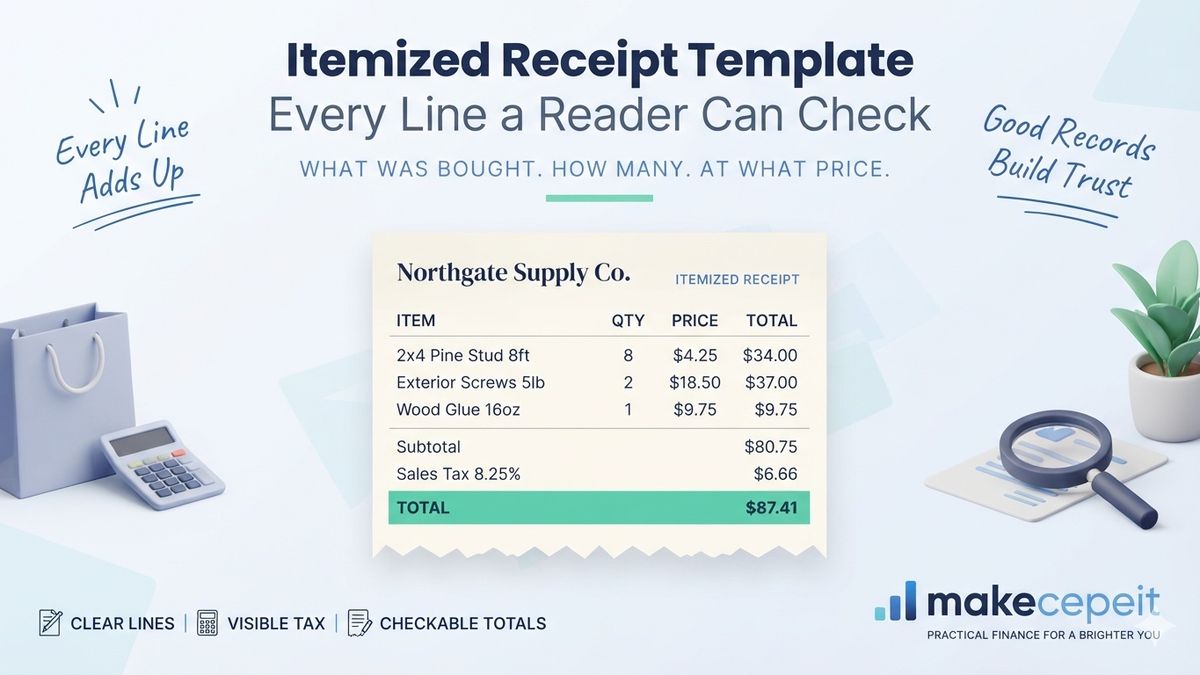
An itemized receipt template is a reusable layout that breaks a sale into individual lines rather than presenting a single total, so anyone reading it can see what was bought, how many, at what unit price, and how the tax and final figure were arrived at. That transparency is the entire purpose, and it is why itemized receipts are requested so often for reimbursement and expense claims.
Across the United States, a lump-sum receipt showing only a total is frequently rejected by the person who has to approve the spending, whether that is a finance team in Chicago or a client in Miami questioning an invoice line. Makecepeit lets you create an itemized receipt from a consistent layout, so the arithmetic and the structure stay the same from one sale to the next.
What Is an Itemized Receipt Template?
It is a receipt layout with a repeating line structure — description, quantity, unit price and line total — sitting above a subtotal, tax and grand total.
The distinguishing feature is not decoration but arithmetic that a reader can follow independently. Given the lines, anyone should be able to reproduce the subtotal, apply the tax rate and arrive at the same total. A receipt that cannot be checked that way is not really itemized, whatever it is labelled.
Why the lines matter more than the total
A total answers one question: how much. The lines answer everything else — what was purchased, whether it was within policy, whether the quantity matches what was delivered, and whether the tax treatment looks right. Approvers generally care about those questions far more than they care about the total, which they can usually see on a card statement anyway.
Where itemized receipts are usually demanded
Expense reimbursement is the common case, and the reason is simple: an employer approving a $180 restaurant charge has no way of knowing from the total whether it covered a client lunch or a bar tab. Insurance claims, warranty support and client billing produce the same demand for the same reason.
What Should an Itemized Receipt Template Include?
- Business name and address, and contact details where relevant
- Receipt number and the date and time of the sale
- A description for each item, specific enough to identify it
- Quantity for each line
- Unit price and a line total for each item
- Subtotal before tax
- Tax label, rate and amount, shown separately
- Grand total in a visually distinct row
- Payment method, with card details masked
- Any discount applied, shown as its own line
A receipt that shows a total of $86.40 without showing how the tax was calculated invites exactly the question it was meant to prevent.
Describing items usefully
"Item" is not a description. Neither is a bare SKU, to anyone outside the business that issued it. The description needs to mean something to the reader — a product name, a service rendered, a quantity of a named material. A hardware supplier in Houston writing "8 x 2x4 pine stud, 8ft" has produced a line that a client can verify. "Lumber, 8 units" has not.
How the Arithmetic Should Read
The structure is straightforward, and getting it wrong is the most common flaw in home-made templates:
- Multiply quantity by unit price for each line total.
- Add every line total to produce the subtotal.
- Apply discounts to the subtotal, shown as a separate line.
- Calculate tax on the discounted subtotal where that is correct locally.
- Add tax to reach the grand total.
- Show the rounding where amounts do not divide cleanly.
- Display the total distinctly so it cannot be misread.
- State the payment method and the amount tendered where cash.
Because the calculation runs automatically in a receipt generator, the arithmetic errors that creep into spreadsheet templates simply do not arise.
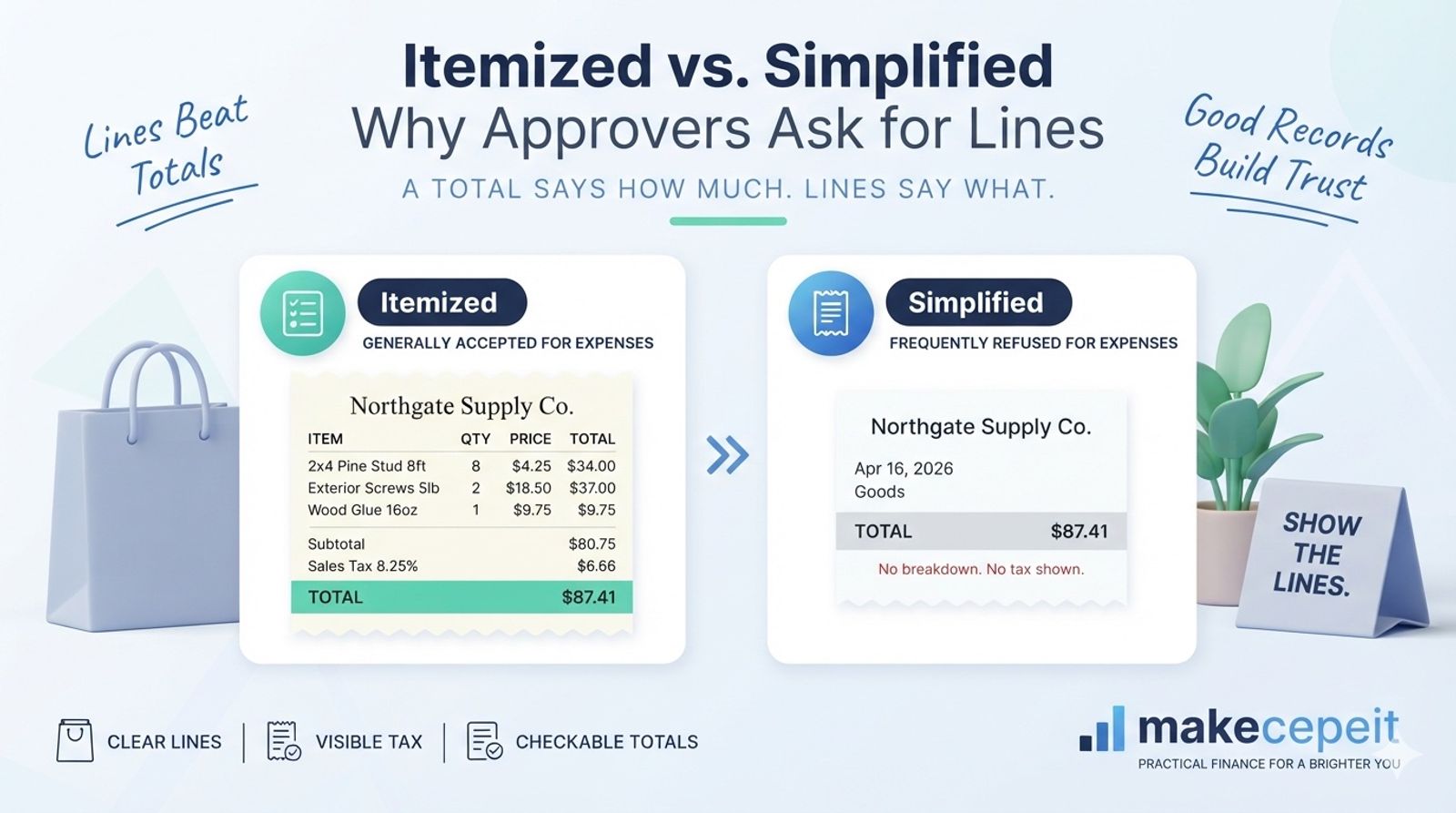
Itemized vs Simplified Receipts
| Feature | Itemized receipt | Simplified receipt |
|---|---|---|
| Line detail | Every item listed separately | Single total, no breakdown |
| Tax shown | Rate and amount separately | Often only the total |
| Accepted for expenses | Generally yes | Frequently refused |
| Typical use | Reimbursement, B2B, claims | Small consumer purchases |
| Length | Longer, sometimes multi-page | Usually a short slip |
The practical consequence is that a business selling to other businesses should default to itemizing, because its customers will ask eventually. A coffee stand selling single drinks has less reason to.
Why Itemized Receipts Matter in the United States
In the U.S., itemization is what makes a receipt usable as evidence of what was actually purchased.
Employers set their own reimbursement rules, and many require itemization above a threshold specifically because a card slip does not establish the nature of the expense. Businesses keeping records for their own filings face a related question: general guidance expects records that substantiate what was bought, not merely what was spent.
Sales tax adds a further reason. Rates vary widely between states, and within states between counties and cities — a sale in Los Angeles carries a different combined rate from one in rural Texas or a state with no sales tax at all. A receipt that shows the rate and the tax amount separately lets both parties confirm the right treatment was applied. One that folds tax invisibly into a total does not.
Treatment varies by state and by transaction, and rules on what records a business must keep differ again by entity type. A tax professional is better placed than any template to confirm the position for a particular business.
Choosing a Format
Different formats suit different volumes, and there is no universally correct answer.
- Spreadsheet templates handle arithmetic well but rarely look like receipts
- Word documents look acceptable but recalculate nothing
- PDF forms print consistently but can be awkward to edit
- Receipt generators handle both layout and arithmetic
- POS systems suit high volume but cost more than low volume justifies
Matching the format to volume
A consultant issuing three receipts a month is well served by almost anything. A supplier issuing thirty a week will find that manual arithmetic becomes the error source long before the layout does. The switch usually happens not because someone decided to upgrade but because a mistake reached a customer.
Handling Tax on an Itemized Receipt
Show the rate, show the amount, and keep them separate from the subtotal.
Mixed-rate sales are where templates break down. Where some items are taxable and others are not, the receipt needs to make clear which lines attracted tax, either by grouping them or by flagging individual lines. Collapsing a mixed-rate sale into one tax figure leaves the reader unable to check anything.
Exempt sales deserve a positive statement rather than silence. A line reading "Tax exempt — resale certificate on file" is more useful than a tax row showing zero with no explanation, and it prompts the seller to confirm the certificate actually is on file.
When an Itemized Receipt Gets Rejected
Most rejections come down to three things: the detail is missing, the arithmetic does not reconcile, or the document does not identify who issued it.
Finance teams refuse receipts constantly, and rarely out of pedantry. A claim submitted with a card slip showing $214.60 and nothing else leaves the approver with no basis to decide anything, so the safe answer is to send it back. The same claim with lines showing what was bought is usually approved without discussion.
Arithmetic that does not reconcile is the second cause, and it may be the most damaging because it raises a question about the document itself rather than about the purchase. A receipt where the lines add to $198.00 but the subtotal reads $189.00 will be queried even if the transposition was innocent, and the person who has to ask is rarely the person who made the error.
The third case is a receipt that does not say who issued it. A slip with a total, a date and no business name identifies nothing. It might have come from anywhere, and an approver has no way to connect it to the supplier the claimant named. Adding the business name and address takes one line in a template and removes the objection permanently.
What to do when a customer disputes a line
Disputes about individual lines are easier to settle when the receipt describes items properly, which is a quiet argument for detail beyond what any rule requires. Where a customer queries a charge, the useful response reproduces the line, its quantity and its unit price, and explains how it reached the total. If the original receipt cannot support that conversation, the business is arguing from memory against a written document, which is a poor position regardless of who is right.
Businesses that sell services rather than goods may find the line structure harder to apply, since hours and deliverables resist neat quantities. The workable approach is generally to treat each distinct piece of work as a line with its own rate and quantity, whether that quantity is hours, days or a fixed fee counted as one. It might look artificial at first, and it reads far better than a single line saying "consulting".
Why Use makecepeit for Itemized Receipts?
- A genuine line-item structure with quantity, price and line totals
- Automatic arithmetic for subtotal, tax and grand total
- A configurable tax label and rate for your jurisdiction
- Consistent layout across every receipt you issue
- PDF and PNG output for email, print or filing
- Reusable business details, so the header is entered once
Makecepeit documents sales that genuinely happened. It is a record-keeping tool, not a way to produce a receipt for a transaction that did not occur, and masking card numbers on anything you send is simply good practice.
Tips Before You Issue One
- Write descriptions a stranger could understand
- Check the tax rate against your current local rate
- Show discounts as separate lines, not silent reductions
- Number receipts sequentially so they can be found again
- Mask card details to the last four digits
- Keep a copy in a format still readable in several years
- Test the arithmetic on a sale with an awkward rounding case
Common Mistakes to Avoid
- Listing items as "Item 1" or bare SKUs nobody outside can read
- Folding tax into the total with no rate shown
- Omitting quantities where more than one was sold
- Applying tax before discounts where local rules say otherwise
- Handling mixed-rate sales with a single tax figure
- Printing full card numbers on a document that gets emailed
- Reusing receipt numbers across a year
- Letting a spreadsheet's rounding disagree with the printed total
Final Takeaway
An itemized receipt template earns its place by making a sale checkable. Describe each item so a stranger could identify it, show quantity and unit price, keep tax visible and separate, and let the arithmetic be reproducible from the lines shown. Requirements for record-keeping vary by state and by business, so confirm specifics with a professional. If you are still deciding whether you need itemization at all, the companion piece on what an itemized receipt is covers the when rather than the how.
Create Itemized Receipts With makecepeit
Enter your lines, set the tax rate once, and let the totals follow. Open the receipt generator and issue receipts your customers can actually check.
Frequently asked questions
- What is an itemized receipt template?
- A reusable layout that lists each item separately with quantity, unit price and line total, above a subtotal, tax row and grand total.
- Why do employers require itemized receipts?
- A card slip shows only an amount. Itemization shows what was actually bought, which is what an approver needs to judge whether it was within policy.
- Should tax be shown separately?
- Generally yes. Showing the rate and the tax amount separately lets both parties confirm the correct local rate was applied to the sale.
- How detailed should item descriptions be?
- Detailed enough for someone outside your business to identify the item. Product names and named services work; bare SKUs and the word item do not.
- How do I handle mixed tax rates?
- Group taxable and non-taxable lines or flag them individually. A single combined tax figure on a mixed sale cannot be checked by the reader.
- Do discounts go before or after tax?
- Commonly tax is calculated on the discounted subtotal, but treatment varies by jurisdiction, so confirm the rule that applies where you sell.
- Is a spreadsheet good enough?
- For low volume, often yes. The risk is manual arithmetic and rounding drifting away from the printed total as volume grows.
- Should I mask card numbers?
- Yes. Showing only the last four digits is standard practice and avoids putting full payment details on a document that may be emailed.
- What if an item is tax exempt?
- State it positively on the receipt, noting the reason, rather than showing a zero tax row with no explanation of why.
- Can makecepeit create itemized receipts?
- Yes. It provides line items with quantity and price, calculates subtotal, tax and total automatically, and exports as PDF or PNG.