AID, TVR & TSI on an EMV Receipt: What They Mean
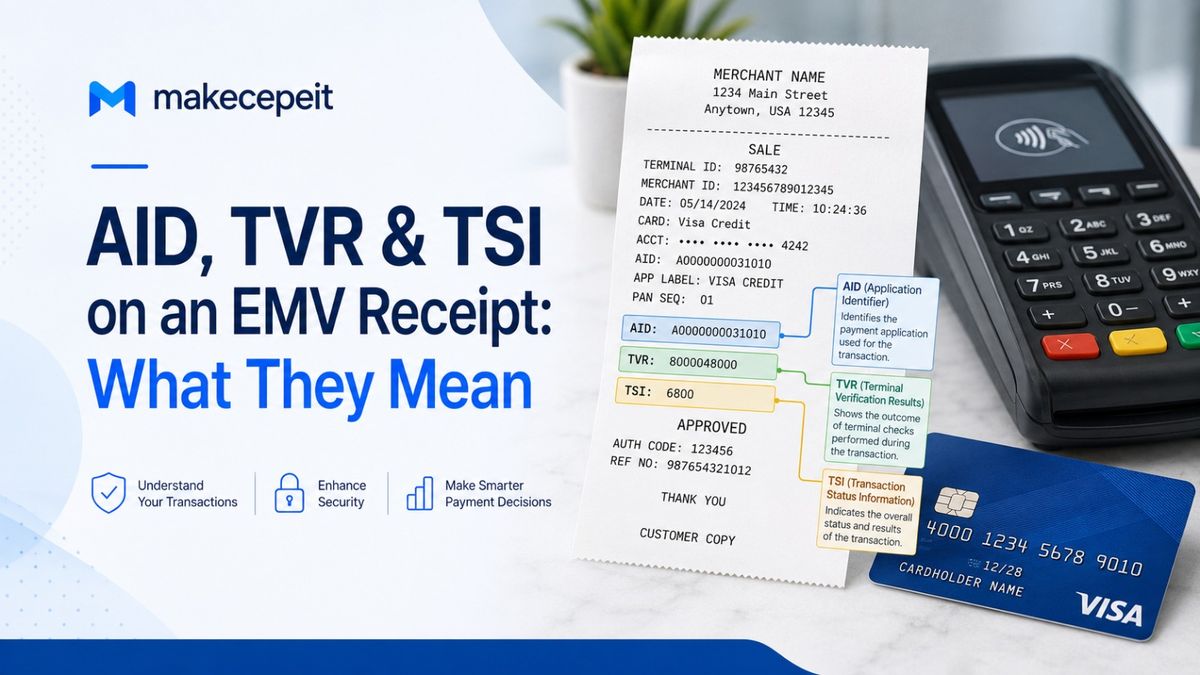
AID, TVR, and TSI are technical EMV chip-payment fields that describe how a card transaction was processed. AID means Application Identifier and identifies the payment application selected for the transaction. TVR means Terminal Verification Results and records conditions detected by the payment terminal. TSI means Transaction Status Information and shows which EMV processing functions were actually performed.
If you see codes such as AID: A000..., TVR: 0000008000, or TSI: E800 on a receipt, they are not random numbers and they are not your card number. They are machine-readable transaction details generated during EMV processing. For U.S. consumers, merchants, developers, and anyone working with receipts through tools such as Makecepeit, understanding these fields can make an unfamiliar chip-card receipt much easier to interpret.
AID, TVR, and TSI Explained at a Glance
The easiest way to understand the three fields is to think of them as answering three different questions: Which payment application was used? What conditions did the terminal detect? Which transaction functions were performed?
| Field | Full Name | Typical EMV Data | What It Tells You |
|---|---|---|---|
| AID | Application Identifier | 5–16 bytes | Which EMV payment application was selected |
| TVR | Terminal Verification Results | 5 bytes / usually 10 hex characters | Conditions and verification results detected by the terminal |
| TSI | Transaction Status Information | 2 bytes / usually 4 hex characters | Which EMV processing functions were performed |
In standard EMV data, the card-side Application Identifier is associated with tag 4F, while a terminal-side AID can use tag 9F06. TVR is EMV tag 95 and is five bytes long. TSI is tag 9B and is two bytes long.
What Does AID Mean on an EMV Receipt?
AID stands for Application Identifier. It identifies the EMV application selected by the card and terminal to process the payment.
An EMV-enabled card can contain one or more payment applications. During a chip or compatible contactless transaction, the terminal determines which supported application should be used. The AID identifies that application in a standardized hexadecimal format.
For example, an AID may appear on a receipt as:
AID: A0000000031010
The code itself should not be interpreted as the customer's account number. It identifies a payment application rather than the individual cardholder's Primary Account Number (PAN). EMV records can contain both card-side and terminal-side AID data, and EMV references define AID values as 5 to 16 bytes long.
Why Does the AID Matter?
The AID can help a payment system, merchant support team, processor, or developer determine which payment application handled a transaction. This can be especially useful when a card supports multiple applications.
In the United States, this can be relevant for debit-card processing because a single physical card may support different debit applications or routing options. The application selected at the terminal can therefore matter during technical troubleshooting, certification, or transaction analysis.
Is the AID the Same as the Authorization Code?
No. An AID identifies the payment application. An authorization or approval code relates to the issuer's authorization response for a particular transaction. They serve different purposes and should not be confused.
What Does TVR Mean on an EMV Receipt?
TVR stands for Terminal Verification Results. It is a five-byte EMV field in which the terminal records the results of checks and conditions encountered while processing the chip transaction.
Because one byte is represented by two hexadecimal characters, a complete five-byte TVR will commonly appear as 10 hexadecimal characters, sometimes separated into groups.
TVR: 0000008000
The important point is that a TVR is not a simple approval or decline code. It is a bit field. Individual bits represent specific conditions detected during different stages of EMV processing.
What Types of Information Can TVR Contain?
Depending on the transaction and EMV implementation, TVR flags can relate to areas such as:
- offline data authentication;
- application restrictions and expiration checks;
- cardholder verification;
- PIN and CVM-related conditions;
- terminal risk management;
- transaction floor-limit conditions;
- issuer authentication; and
- issuer script processing.
For example, EMV specifications assign TVR bits to conditions such as an expired application, unsuccessful cardholder verification, a transaction exceeding a floor limit, or certain authentication failures.
Does a Non-Zero TVR Mean the Transaction Failed?
No. A non-zero TVR does not automatically mean a card payment was declined.
Some TVR bits merely record that a particular condition existed or that a particular process was not performed. EMV transaction decisions can involve terminal rules, card rules, issuer authorization, cryptograms, cardholder verification, and other data.
For that reason, you should never diagnose an approval or decline by looking at the TVR alone.
What Does TSI Mean on an EMV Receipt?
TSI stands for Transaction Status Information. It indicates which major EMV transaction-processing functions were performed by the terminal.
TSI is a two-byte EMV data object, so it is commonly displayed as four hexadecimal characters.
TSI: E800
Where TVR records results and conditions, TSI primarily records whether certain processing functions occurred.
What Can the TSI Record?
The first byte of TSI can indicate whether functions such as the following were performed:
- offline data authentication;
- cardholder verification;
- card risk management;
- issuer authentication;
- terminal risk management; and
- issuer script processing.
These functions are represented by individual bits rather than readable words on most receipts. The EMV specification defines TSI as a two-byte field and assigns its first-byte bits to these processing functions.
Does TSI Show Whether the Transaction Was Approved?
No. TSI tells you which functions were performed, not whether the issuer ultimately approved the transaction.
For example, a TSI can indicate that cardholder verification occurred. That does not, by itself, tell you everything about the result of that verification or the final authorization decision. You may need the TVR, CVM results, authorization response, cryptogram data, and processor records for a full technical analysis.
What Is the Difference Between TVR and TSI?
TVR describes what the terminal observed; TSI describes what the terminal did. That is the simplest useful distinction.
Suppose cardholder verification was part of a transaction. The TSI may indicate that cardholder verification was performed. The TVR can separately contain information about a problem or exception encountered during verification.
Technical payment analysis therefore often considers TVR and TSI together rather than treating either field as a complete transaction summary.
Why Do AID, TVR, and TSI Appear on Receipts in the United States?
EMV payment terminals process considerably more data than an ordinary shopper needs to see. Some U.S. POS systems print selected EMV data because it can help merchants, processors, payment technicians, and support teams identify how a transaction was processed.
Visa's U.S. transaction-device guidance, for example, has identified the AID as information required on applicable chip transaction receipts. Receipt requirements can also depend on the payment network, transaction type, merchant setup, acquirer, and terminal configuration.
A shopper in New York, California, Texas, Florida, or anywhere else in the country may therefore encounter technical EMV fields even though those fields are mainly useful behind the scenes.
Are AID, TVR, and TSI Sensitive Card Information?
AID, TVR, and TSI are not substitutes for the card number, PIN, or security code. They describe the EMV application and transaction processing state.
However, receipts should still be treated as financial records because they may contain merchant information, transaction times, amounts, authorization references, and part of a payment-card number.
For electronically printed consumer receipts in the United States, federal law prohibits printing more than the last five digits of the credit or debit card number and prohibits printing the card's expiration date. The FTC likewise advises businesses to truncate card information on consumer receipts.
How to Read AID, TVR, and TSI on an EMV Receipt
If you are trying to understand a real chip-card receipt, use this process instead of guessing what a hexadecimal code means.
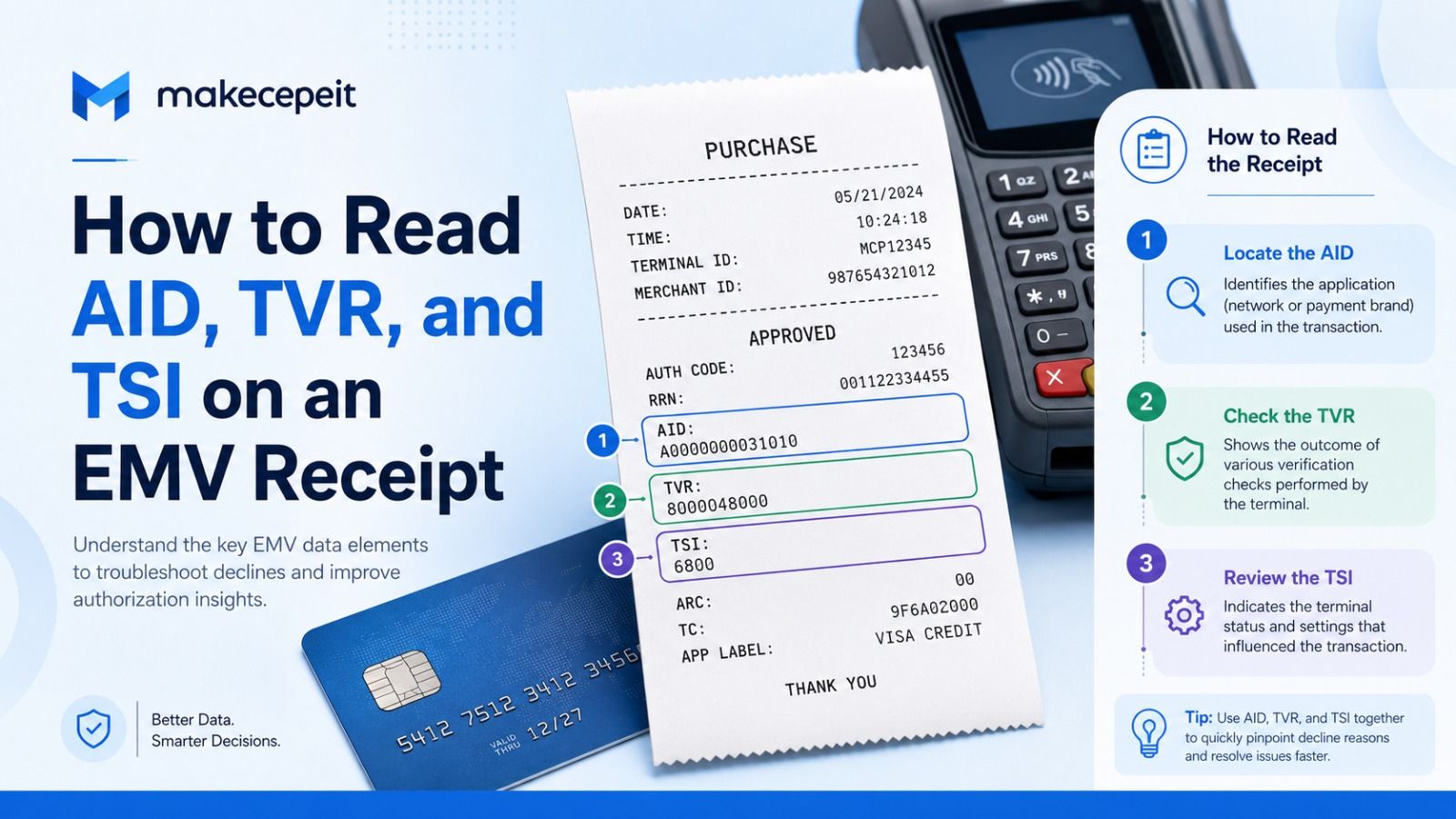
- Find the EMV payment section. Look near the card type, masked account number, entry mode, authorization code, or payment total.
- Identify the labels. Look specifically for AID, TVR, and TSI.
- Read the AID as an application identifier. Do not treat it as the card number or approval code.
- Check the TVR as a five-byte bit field. Decode individual bits only against the correct EMV specification or reliable processor documentation.
- Check the TSI as a two-byte status field. Use it to determine which processing functions occurred.
- Review related transaction data. Authorization responses, CVM information, entry method, processor logs, and other EMV tags may be necessary for technical troubleshooting.
- Contact the processor when investigating a real failure. A consumer receipt alone may not contain enough information to determine precisely why a transaction was declined.
Other EMV Fields You May See on a Receipt
AID, TVR, and TSI are only part of the information generated during an EMV transaction. Depending on the terminal, payment processor, and receipt configuration, you may also encounter:
- CVM: Cardholder Verification Method, which relates to how the cardholder was verified.
- ARQC: Authorization Request Cryptogram, generated during applicable online EMV authorization flows.
- TC: Transaction Certificate, associated with certain approved transaction outcomes.
- AAC: Application Authentication Cryptogram, associated with a card decision not to approve a transaction.
- ATC: Application Transaction Counter maintained by the chip application.
- Application Label: a human-readable name associated with an application.
Not every terminal prints these fields, and their absence from the cardholder receipt does not necessarily mean they were absent from the underlying payment message.
Common Mistakes When Interpreting EMV Receipt Codes
1. Assuming the AID Is the Card Number
An AID identifies an application. It should never be interpreted as the customer's PAN.
2. Treating TVR as a Decline Code
TVR contains multiple independent flags. A single TVR value does not automatically reveal the final authorization decision.
3. Assuming TSI Means "Transaction Successful"
Despite the word "status," TSI primarily indicates which EMV functions were performed. It is not a general success or approval flag.
4. Guessing Technical Values When Recreating a Receipt
If a legitimate receipt must be reconstructed for record-keeping, never invent AID, TVR, TSI, authorization, or other payment data. Retrieve the correct information from the original receipt, POS system, processor dashboard, merchant records, or payment provider.
5. Ignoring Card-Data Truncation
A professional receipt should not expose sensitive card information. In the U.S., electronically printed cardholder receipts are specifically subject to federal card-number and expiration-date truncation requirements.
Why Use Makecepeit When Formatting a Legitimate Receipt?
Understanding EMV terminology and creating a readable receipt are two different tasks. If you already have accurate transaction information and need to organize it into a clean receipt format, Makecepeit provides customizable receipt-building tools designed for legitimate business records, expense documentation, development, design, and related workflows.
Makecepeit allows users to customize receipt information and create structured receipt layouts in common export formats. The important rule when working with EMV data is accuracy: if AID, TVR, TSI, an authorization code, or another payment field is included, it should come from genuine transaction records rather than being guessed or fabricated.
A receipt builder can help present verified information clearly, but it cannot determine the authentic TVR or TSI of a historical transaction without the original payment data.
Tips Before Using EMV Data From a Receipt
- Keep the original receipt when investigating a payment problem.
- Match the amount, date, time, and masked card digits against your card statement.
- Do not publish complete transaction logs online when asking for technical help.
- Use authoritative EMV or payment-processor documentation when decoding individual TVR bits.
- Remember that contact and contactless transaction flows can differ.
- Do not assume every hexadecimal field is meant to be understood by the cardholder.
- For charge disputes or unexplained declines, contact the merchant, acquiring processor, or card issuer as appropriate.
Final Answer: What Do AID, TVR and TSI Mean on an EMV Receipt?
AID identifies the EMV payment application, TVR records the terminal's verification results and detected conditions, and TSI indicates which EMV transaction functions were performed.
They are technical transaction-processing fields rather than customer account numbers. AID helps identify the application selected by the card and terminal. TVR is a five-byte set of verification flags. TSI is a two-byte record of processing activities.
For ordinary consumers, these codes usually require no action. For merchants, developers, payment technicians, and anyone troubleshooting a chip-card transaction, however, they can provide valuable context when combined with the rest of the EMV transaction data.
Create Clear, Accurate Receipt Records With Makecepeit
If you need to organize genuine transaction information into a professional receipt, Makecepeit can help you build a clean, readable format while keeping the details under your control. Use the actual transaction records, verify every payment field, and create a receipt that clearly documents what really occurred.
Start with Makecepeit when you have the verified details and want a structured receipt that is easy to review, save, or share.
Frequently asked questions
- What does AID mean on a credit card receipt?
- AID means Application Identifier. It identifies the EMV payment application selected by the chip card and payment terminal.
- What does TVR mean on an EMV receipt?
- TVR means Terminal Verification Results. It is a five-byte EMV field containing flags for conditions detected during transaction processing.
- What does TSI mean on a receipt?
- TSI means Transaction Status Information. It is a two-byte EMV field indicating which major transaction-processing functions were performed.
- Is AID my credit card number?
- No. The AID identifies a payment application and is different from the cardholder's Primary Account Number.
- Can TVR tell me why my card was declined?
- Not by itself. TVR may identify relevant conditions, but the final transaction outcome can depend on several EMV and issuer authorization factors.
- Does a non-zero TVR mean there was an error?
- Not necessarily. A non-zero TVR simply means one or more defined EMV conditions were flagged. It does not automatically indicate a failed transaction.
- Does TSI show whether a card payment was approved?
- No. TSI records whether certain processing functions were performed; it is not the transaction's approval code.
- What EMV tag is TVR?
- Terminal Verification Results is EMV tag 95 and has a length of five bytes.
- What EMV tag is TSI?
- Transaction Status Information is EMV tag 9B and has a length of two bytes.
- Should I manually add AID, TVR, and TSI when recreating a receipt?
- Only add them when you have the authentic values from the original transaction or trusted merchant or processor records. Do not guess or invent EMV transaction data.